> ## Documentation Index
> Fetch the complete documentation index at: https://docs.bfl.ml/llms.txt
> Use this file to discover all available pages before exploring further.
# FLUX.2 LoRA Inference
> Run your trained LoRAs on FLUX.2 [klein] via the BFL API. Upload once in the Dashboard, then call the fine-tuned endpoint with your finetune_id.
**Public Beta** — LoRA inference endpoints are in public beta. Pricing, parameters, and endpoint names may change before general availability.
Train a LoRA once with the tools of your choice (AI-Toolkit, Diffusers, …), upload it to the BFL Dashboard — where they're surfaced as **Finetunes** — then serve inference through a managed endpoint. No GPUs to provision, same polling workflow as the rest of the FLUX.2 API.
New to training? Start with the [FLUX.2 \[klein\] Training guide](/flux_2/flux2_klein_training) and the [step-by-step training example](/flux_2/flux2_klein_training_example), then come back here to serve your LoRA.
## How It Works
Train a LoRA locally against a FLUX.2 \[klein] Base model using [AI-Toolkit](https://github.com/ostris/ai-toolkit) or [Diffusers](https://github.com/huggingface/diffusers/blob/main/examples/dreambooth/README_flux2.md). The Dashboard upload dialog accepts `.safetensors` checkpoints.
In the [Dashboard](https://dashboard.bfl.ai/), go to **Customization → Finetunes** and click **+ Add Finetune**. Pick the matching base model, give it a name (lowercase letters, digits, hyphens, and underscores only), optionally set a trigger phrase, and drop in the checkpoint. The name you pick is your `finetune_id`.
POST to the `{base_model}-finetuned` endpoint with your `finetune_id`, then poll the returned `polling_url` until status is `Ready`.
## Available Endpoints
Each supported base model has a corresponding `-finetuned` endpoint. The request schema matches the underlying base endpoint, with two added parameters: `finetune_id` and `finetune_strength`.
| Endpoint | Base Model | Precision |
| --------------------------------------- | ------------------------------ | --------- |
| `/v1/flux-2-klein-4b-finetuned` | FLUX.2 \[klein] 4B | FP8 |
| `/v1/flux-2-klein-9b-finetuned` | FLUX.2 \[klein] 9B | FP8 |
| `/v1/flux-2-klein-9b-kv-finetuned` | FLUX.2 \[klein] 9B (KV-cached) | FP8 |
| `/v1/flux-2-klein-9b-kv-bf16-finetuned` | FLUX.2 \[klein] 9B (KV-cached) | BF16 |
| `/v1/flux-2-klein-base-4b-finetuned` | FLUX.2 \[klein] Base 4B | FP8 |
| `/v1/flux-2-klein-base-9b-finetuned` | FLUX.2 \[klein] Base 9B | FP8 |
The endpoint you call must match the base model and precision selected in the Dashboard. FP8 is the default precision. BF16 is currently available only for `flux-2-klein-9b-kv` and maps to `/v1/flux-2-klein-9b-kv-bf16-finetuned`.
### `finetune_id` format
* **Own LoRA**: pass the name you chose in the Dashboard (e.g. `my-portrait-lora`).
* **LoRA shared with your organization**: prefix the owner's organization ID — `{owner_org_id}/{lora_name}`.
## Quick Start
Replace `my-portrait-lora` with the name of a finetune uploaded to your organization.
```bash cURL theme={null}
# Submit
RESPONSE=$(curl -s -X POST 'https://api.bfl.ai/v1/flux-2-klein-9b-kv-finetuned' \
-H "x-key: $BFL_API_KEY" \
-H 'Content-Type: application/json' \
-d '{
"prompt": "A portrait of ohwx in a sunlit studio, soft key light",
"finetune_id": "my-portrait-lora",
"finetune_strength": 1.0
}')
POLLING_URL=$(echo "$RESPONSE" | jq -r '.polling_url')
# Poll
while true; do
RESULT=$(curl -s "$POLLING_URL" -H "x-key: $BFL_API_KEY")
STATUS=$(echo "$RESULT" | jq -r '.status')
[ "$STATUS" = "Ready" ] && echo "$RESULT" | jq -r '.result.sample' && break
[ "$STATUS" = "Error" ] || [ "$STATUS" = "Failed" ] && echo "$RESULT" && break
sleep 1
done
```
```python Python theme={null}
import os, time, requests
response = requests.post(
"https://api.bfl.ai/v1/flux-2-klein-9b-kv-finetuned",
headers={"x-key": os.environ["BFL_API_KEY"], "Content-Type": "application/json"},
json={
"prompt": "A portrait of ohwx in a sunlit studio, soft key light",
"finetune_id": "my-portrait-lora",
"finetune_strength": 1.0,
},
).json()
while True:
time.sleep(1)
result = requests.get(
response["polling_url"], headers={"x-key": os.environ["BFL_API_KEY"]}
).json()
if result["status"] == "Ready":
print(result["result"]["sample"])
break
if result["status"] in ("Error", "Failed"):
print(result)
break
```
The async submit-and-poll pattern, response shape, and signed-URL expiry are the same as every other FLUX.2 endpoint. See [API Integration](/api_integration/integration_guidelines) for the canonical reference.
## Request Parameters
The `-finetuned` endpoint accepts every parameter of its base endpoint, plus these two LoRA-specific fields:
| Parameter | Type | Required | Description |
| ------------------- | ------ | -------- | ------------------------------------------------------------------------------------------------------------------------------------------------------------------------------------ |
| `finetune_id` | string | Yes | Name of an uploaded finetune available to your organization. For finetunes shared with you, prefix with the owner org ID: `{owner_org_id}/{name}`. |
| `finetune_strength` | float | No | How strongly the LoRA is applied. Defaults to `1.0`. See [Tuning finetune\_strength](#tuning-finetune_strength) below. Include the LoRA's trigger phrase in `prompt` if one was set. |
For the rest of the request and response schema (prompt, dimensions, `input_image_*`, seed, output format, polling response), see the base endpoint in the [API Reference](/api-reference/).
## Behavior & Limits
* **One LoRA per request.** The API takes a single `finetune_id`; stacking multiple LoRAs is not supported.
* **Base-model match is strict.** Calling `flux-2-klein-4b-finetuned` with a `finetune_id` uploaded for `flux-2-klein-9b` will fail — pick the endpoint that matches the finetune's base model.
* **Rate limits and polling** are identical to the base endpoint. See [API Integration](/api_integration/integration_guidelines).
### Tuning `finetune_strength`
`finetune_strength` scales the LoRA's contribution at inference time.
* Start at **`1.0`** — the default, and what the Dashboard's copy-paste snippet uses.
* If the LoRA overpowers the prompt (every output looks like your training set regardless of what you ask for), sweep **`0.7 → 0.9`** with the same `seed` to find the point where the style/subject is preserved without collapsing variety.
* Lower values bias the generation back toward the base model.
* Always include the LoRA's trigger phrase (if one was set during upload) in the prompt — strength alone won't activate a phrase-gated LoRA.
## Using Finetunes in the Playground
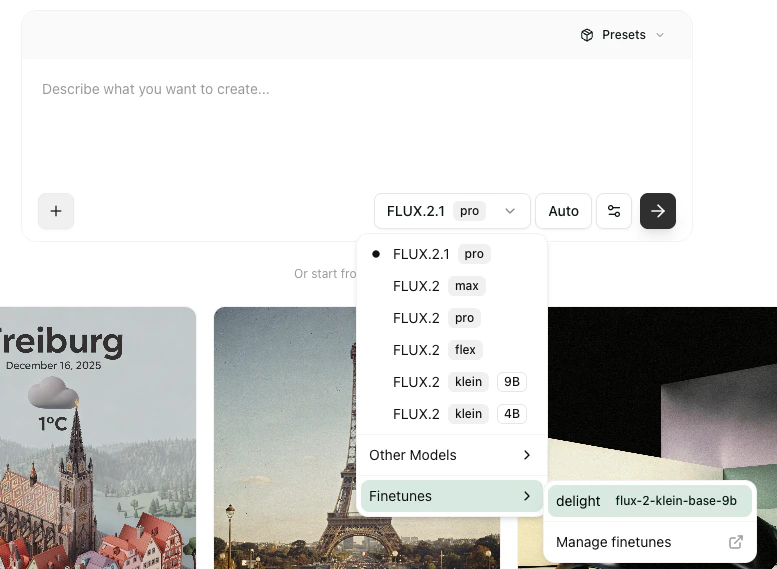
Finetunes are also available in the [Playground](https://playground.bfl.ai/). Open the model picker, expand **Finetunes**, and pick one of your uploaded finetunes — the Playground auto-routes to the matching `-finetuned` endpoint.
 ## Managing Finetunes in the Dashboard
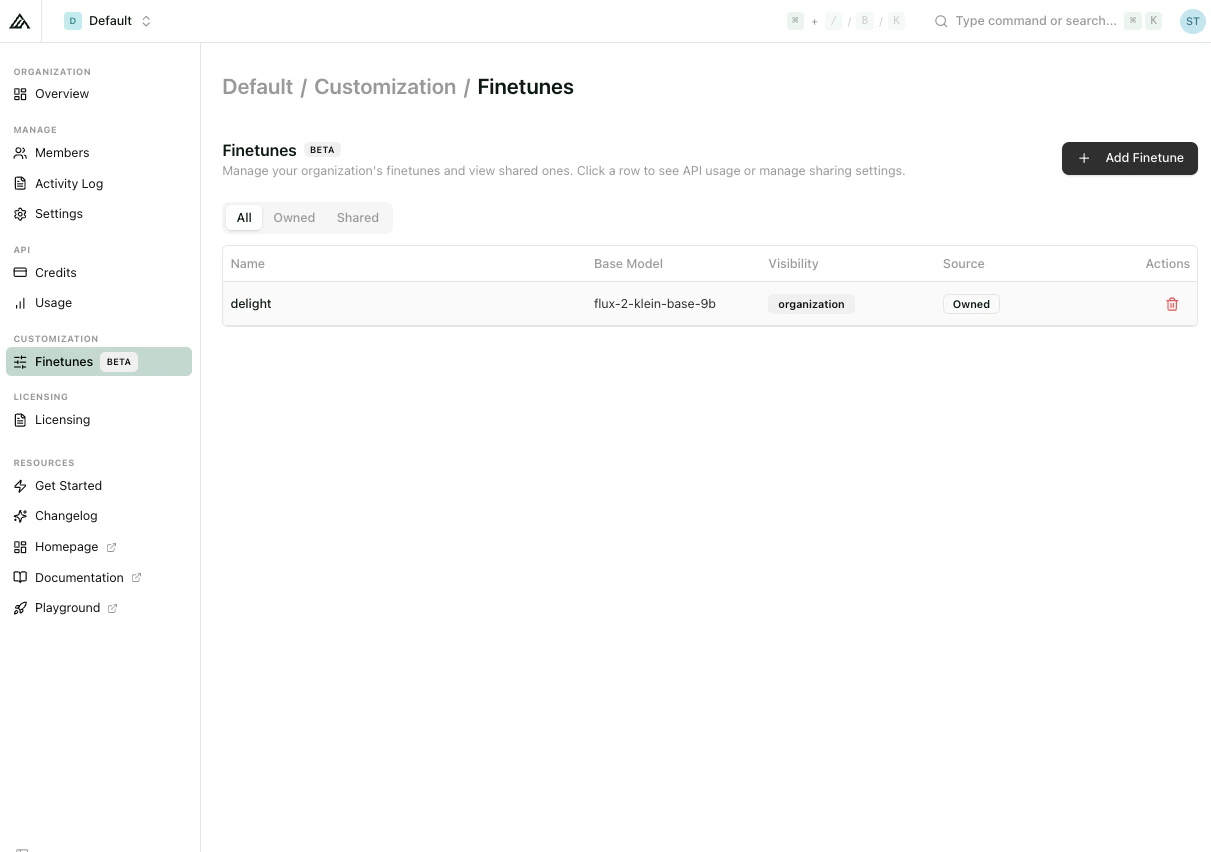
LoRAs are managed under [**Customization → Finetunes**](https://dashboard.bfl.ai/) in the Dashboard, where the feature is currently marked **BETA**.
The list view shows columns for **Name**, **Base Model**, **Source** (Owned / Official / Third party), and **Actions**, with **All / Owned / Shared** filter tabs. Clicking a row expands an inline detail panel with an auto-generated API example and editable settings.
## Managing Finetunes in the Dashboard
LoRAs are managed under [**Customization → Finetunes**](https://dashboard.bfl.ai/) in the Dashboard, where the feature is currently marked **BETA**.
The list view shows columns for **Name**, **Base Model**, **Source** (Owned / Official / Third party), and **Actions**, with **All / Owned / Shared** filter tabs. Clicking a row expands an inline detail panel with an auto-generated API example and editable settings.
 ### Uploading a finetune
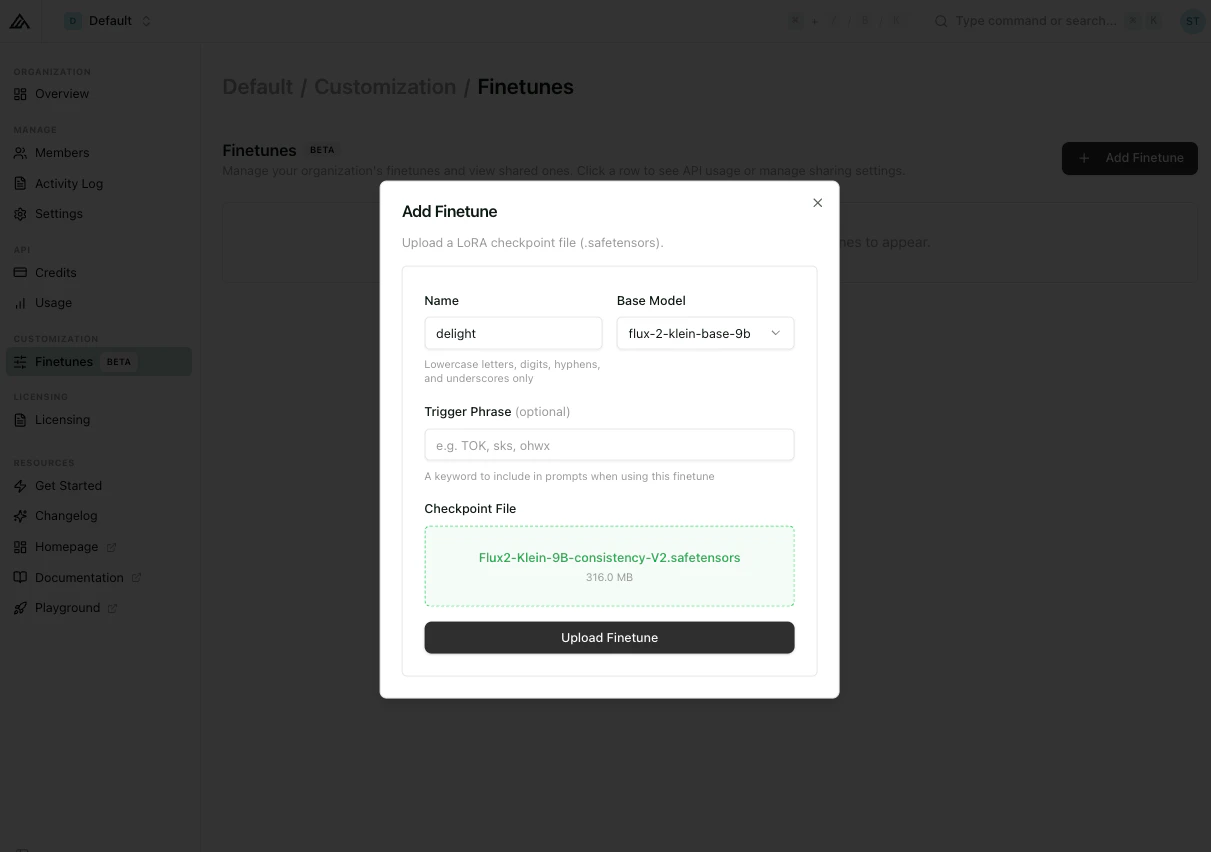
Click **+ Add Finetune** in the top-right to open the upload dialog. Fields:
### Uploading a finetune
Click **+ Add Finetune** in the top-right to open the upload dialog. Fields:
 | Field | Notes |
| ------------------------------- | ------------------------------------------------------------------------------------------------------------------- |
| **Name** | Becomes your `finetune_id`. Validation: *Lowercase letters, digits, hyphens, and underscores only.* |
| **Base Model** | Dropdown. Must match the model your LoRA was trained against — this determines which `-finetuned` endpoint to call. |
| **Precision** | Dropdown. FP8 is the default. BF16 is currently available only for `flux-2-klein-9b-kv`. |
| **Trigger Phrase** *(optional)* | Placeholder `e.g. TOK, sks, ohwx`. A keyword to include in prompts when using this finetune. |
| **Checkpoint File** | `.safetensors` file, drag-and-drop or click to select. |
Submit with **Upload Finetune**.
### Editing a finetune
Expanding a row reveals the detail panel, which contains:
| Field | Notes |
| ------------------------------- | ------------------------------------------------------------------------------------------------------------------- |
| **Name** | Becomes your `finetune_id`. Validation: *Lowercase letters, digits, hyphens, and underscores only.* |
| **Base Model** | Dropdown. Must match the model your LoRA was trained against — this determines which `-finetuned` endpoint to call. |
| **Precision** | Dropdown. FP8 is the default. BF16 is currently available only for `flux-2-klein-9b-kv`. |
| **Trigger Phrase** *(optional)* | Placeholder `e.g. TOK, sks, ohwx`. A keyword to include in prompts when using this finetune. |
| **Checkpoint File** | `.safetensors` file, drag-and-drop or click to select. |
Submit with **Upload Finetune**.
### Editing a finetune
Expanding a row reveals the detail panel, which contains:
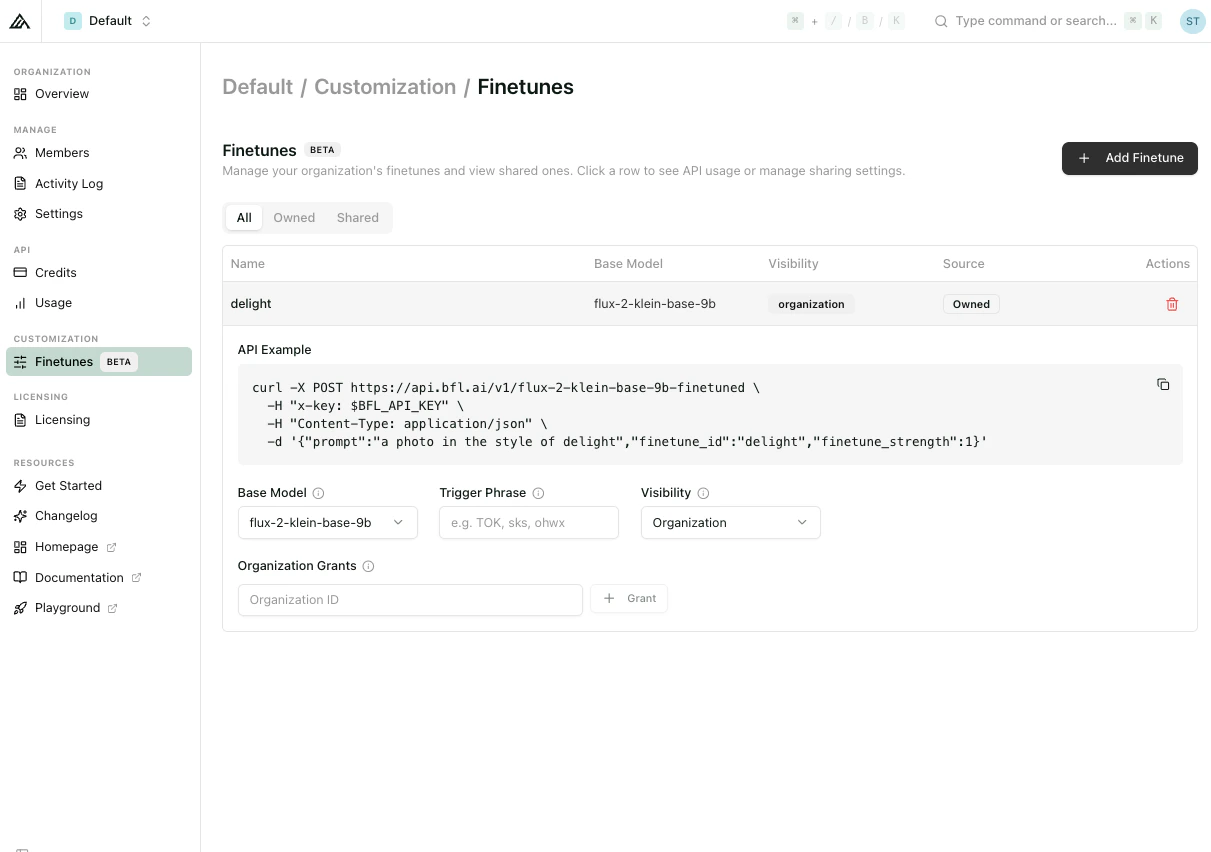 * **Base Model** — dropdown, can be changed post-upload if needed.
* **Precision** — dropdown with `FP8` and `BF16`. BF16 can currently be selected only for `flux-2-klein-9b-kv`.
* **Trigger Phrase** — editable, clearable.
* **Share with another Organization** — input labelled *Organization ID* plus a **+ Grant** button to share the finetune with another BFL organization.
* **API Example** — an auto-generated curl snippet that pre-fills `finetune_id`, `finetune_strength`, and a prompt that uses the trigger phrase if one is set.
Non-owners address the finetune by its fully-qualified ID: `{owner_org_id}/{finetune_name}`.
Organization sharing is targeted by organization ID. Granted finetunes appear under the recipient's **Shared** tab.
**Billing is always on the caller.** Generations are billed to the API key that issues the request, regardless of who owns the finetune. Granting a finetune to another org does not expose the owner to inference costs incurred by callers.
## Pricing
During public beta, LoRA endpoints are billed at the same rate as their base endpoint at the same resolution. See [API Pricing](/quick_start/pricing#fine-tuned-endpoints-public-beta) for the current rates.
## Next Steps
Learn how to train a LoRA against a FLUX.2 \[klein] Base model.
Step-by-step walkthrough with a real dataset.
Current rates for fine-tuned endpoints.
Full request and response schemas.
* **Base Model** — dropdown, can be changed post-upload if needed.
* **Precision** — dropdown with `FP8` and `BF16`. BF16 can currently be selected only for `flux-2-klein-9b-kv`.
* **Trigger Phrase** — editable, clearable.
* **Share with another Organization** — input labelled *Organization ID* plus a **+ Grant** button to share the finetune with another BFL organization.
* **API Example** — an auto-generated curl snippet that pre-fills `finetune_id`, `finetune_strength`, and a prompt that uses the trigger phrase if one is set.
Non-owners address the finetune by its fully-qualified ID: `{owner_org_id}/{finetune_name}`.
Organization sharing is targeted by organization ID. Granted finetunes appear under the recipient's **Shared** tab.
**Billing is always on the caller.** Generations are billed to the API key that issues the request, regardless of who owns the finetune. Granting a finetune to another org does not expose the owner to inference costs incurred by callers.
## Pricing
During public beta, LoRA endpoints are billed at the same rate as their base endpoint at the same resolution. See [API Pricing](/quick_start/pricing#fine-tuned-endpoints-public-beta) for the current rates.
## Next Steps
Learn how to train a LoRA against a FLUX.2 \[klein] Base model.
Step-by-step walkthrough with a real dataset.
Current rates for fine-tuned endpoints.
Full request and response schemas.