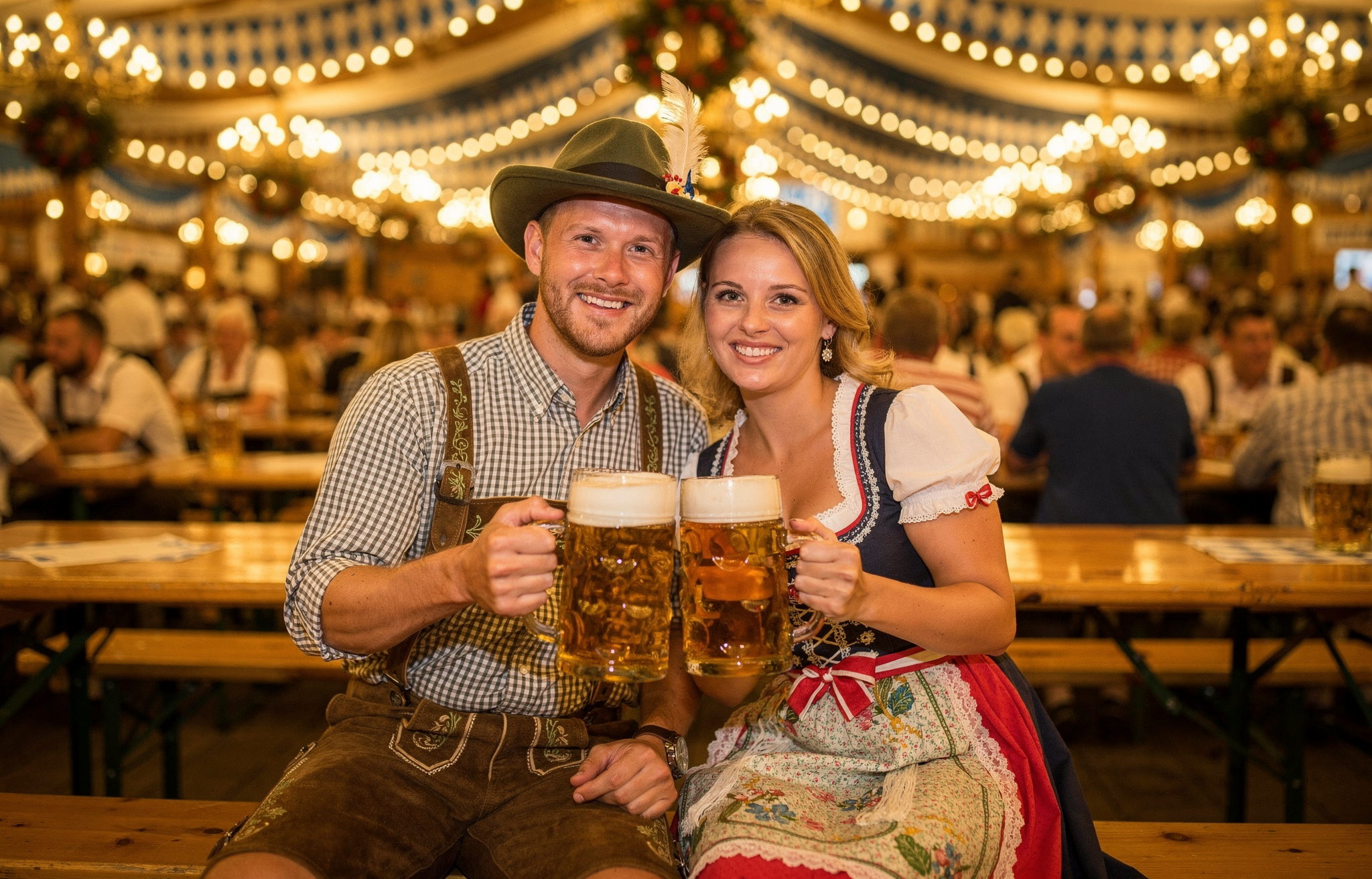
> ## Documentation Index
> Fetch the complete documentation index at: https://docs.bfl.ml/llms.txt
> Use this file to discover all available pages before exploring further.

# Prompting Guide - FLUX.2 [pro] & [max]

> Master FLUX.2 [pro] & [max] prompting for photorealism, typography, precise colors, and advanced techniques

export const PromptDisplay = ({prompt}) => {
  const [copied, setCopied] = useState(false);
  const copy = () => {
    navigator.clipboard.writeText(prompt);
    setCopied(true);
    setTimeout(() => setCopied(false), 2000);
  };
  return <div className="not-prose" style={{
    marginTop: "1rem"
  }}>
      <div style={{
    backgroundColor: "#1a1a1a",
    borderRadius: "1rem",
    padding: "1.25rem 1.5rem",
    display: "flex",
    flexDirection: "column",
    gap: "1rem"
  }}>
        <p style={{
    color: "#e5e5e5",
    fontSize: "1rem",
    lineHeight: 1.6,
    margin: 0,
    fontFamily: "inherit"
  }}>
          {prompt}
        </p>
        <div style={{
    display: "flex",
    justifyContent: "flex-end"
  }}>
          <button onClick={copy} style={{
    backgroundColor: copied ? "#3d8a5b" : "var(--aspen-evergreen, #486A58)",
    color: "#fff",
    border: "none",
    borderRadius: "0.375rem",
    padding: "0.25rem 0.6rem",
    fontSize: "0.7rem",
    fontWeight: 600,
    cursor: "pointer",
    transition: "background-color 0.2s"
  }}>
            {copied ? "Copied!" : "Copy prompt"}
          </button>
        </div>
      </div>
    </div>;
};

<Info>
  **No negative prompts**: FLUX.2 does not support negative prompts. Focus on describing what you want, not what you don't want.
</Info>

## Prompt Structure

Use this framework for consistent results: **Subject + Action + Style + Context**

* **Subject**: The main focus (person, object, character)
* **Action**: What the subject is doing or their pose
* **Style**: Artistic approach, medium, or aesthetic
* **Context**: Setting, lighting, time, mood, or atmospheric conditions

<Tabs>
  <Tab title="Example 1">
    <Frame>
      ![Black cat behind watermelon slice](https://cdn.sanity.io/images/2gpum2i6/production/5e03a74ae6a124c0a98b8c2b5c9f1b58aee0a4a9-1888x1056.png)
    </Frame>

    <PromptDisplay prompt="Black cat hiding behind a watermelon slice, professional studio shot, bright red and turquoise background with summer mystery vibe" />
  </Tab>

  <Tab title="Example 2">
    <Frame>
      ![Dog wrapped in towel after bath](https://cdn.sanity.io/images/2gpum2i6/production/073285e5f38fe7ebea92f73867ae8ce28f012611-1888x1056.png)
    </Frame>

    <PromptDisplay prompt="Dog wrapped in white towel after bath, photographed with direct flash and high exposure, fur wet details sharply visible, editorial raw portrait, cinematic harsh flash lighting, intimate humorous documentary style" />
  </Tab>

  <Tab title="Example 3">
    <Frame>
      ![](https://cdn.sanity.io/images/2gpum2i6/production/a9b98403303c3b3d722cfd7c39f1c61217013053-1888x1056.png)
    </Frame>

    <PromptDisplay prompt="A small red propeller plane banking sharply between massive jungle trees in a bright anime style, with midday sun illuminating lush green foliage and waterfalls cascading in the background." />
  </Tab>

  <Tab title="Example 4">
    <Frame>
      ![](https://cdn.sanity.io/images/2gpum2i6/production/738b57f7d94a47351bb70ff8e87d45d00809aaee-1888x1056.png)
    </Frame>

    <PromptDisplay prompt="A businessman in a charcoal grey suit resting his arms on a bamboo railing at a secluded beach in the Philippines, cigarette glowing between his lips, illustrated in a vintage Japanese woodblock print style with soft pastel tones, calm turquoise waters, and a hazy afternoon sky." />
  </Tab>
</Tabs>

Word order matters - FLUX.2 pays more attention to what comes first. Put your most important elements at the beginning:

**Priority order**: Main subject → Key action → Critical style → Essential context → Secondary details

**Prompt length guidance**:

* **Short (10-30 words)**: Quick concepts and style exploration
* **Medium (30-80 words)**: Usually ideal for most projects
* **Long (80+ words)**: Complex scenes requiring detailed specifications

## Photorealistic Styles

FLUX.2 generates photorealistic images from simple, natural language prompts. Reference specific eras, cameras, and techniques for distinctive looks.

### Style Reference Guide

| Style              | Key Descriptors                                                                      |
| ------------------ | ------------------------------------------------------------------------------------ |
| **Modern Digital** | "shot on Sony A7IV, clean sharp, high dynamic range"                                 |
| **2000s Digicam**  | "early digital camera, slight noise, flash photography, candid, 2000s digicam style" |
| **80s Vintage**    | "film grain, warm color cast, soft focus, 80s vintage photo"                         |
| **Analog Film**    | "shot on Kodak Portra 400, natural grain, organic colors"                            |

<Tabs>
  <Tab title="Modern Photorealism">
    <Frame>
      ![Tiger cub under banana leaf in rainy jungle](https://cdn.sanity.io/images/2gpum2i6/production/bc6432890df19f127624df9eb47c7d5fdd984a3d-2656x1504.png)
    </Frame>

    <PromptDisplay prompt="Soaking wet tiger cub taking shelter under a banana leaf in the rainy jungle, close up photo" />
  </Tab>

  <Tab title="2000s Digicam">
    <Frame>
      ![Sloth in Bangkok nightlife, digicam style](https://cdn.sanity.io/images/2gpum2i6/production/d02f27fc01e66dca0f812c02678e3502cf664d19-1328x752.png)
    </Frame>

    <PromptDisplay prompt="Sloth out drinking in Bangkok at night in a street full of party folks, 2000s digicam style, people in the background fading" />
  </Tab>

  <Tab title="80s Vintage">
    <Frame>
      ![Baby penguins in trampoline park, 80s vintage](https://cdn.sanity.io/images/2gpum2i6/production/ef2490df716e6b6eeaf7d7bc4e9af0200fa53b52-1328x752.png)
    </Frame>

    <PromptDisplay prompt="A group of baby penguins in a trampoline park, having the time of their lives, 80s vintage photo" />
  </Tab>

  <Tab title="Analog Photography">
    <Frame>
      ![](https://cdn.sanity.io/images/2gpum2i6/production/dc7ce17bfc1ec5d526ae33bc975d00459590f9de-1328x752.png)
    </Frame>

    <PromptDisplay prompt="An old faded family portrait photograph from the early 1900s showing a family of five standing stiffly in front of their modest wooden farmhouse" />
  </Tab>
</Tabs>

### Camera and Lens Simulation

Be specific about camera settings for authentic results:

```
Shot on Hasselblad X2D, 80mm lens, f/2.8, natural lighting
```

```
Canon 5D Mark IV, 24-70mm at 35mm, golden hour, shallow depth of field
```

<Tip>
  For photorealism, specify camera models, lenses, and film stocks. "Shot on Fujifilm X-T5, 35mm f/1.4" produces more authentic results than just "professional photo."
</Tip>

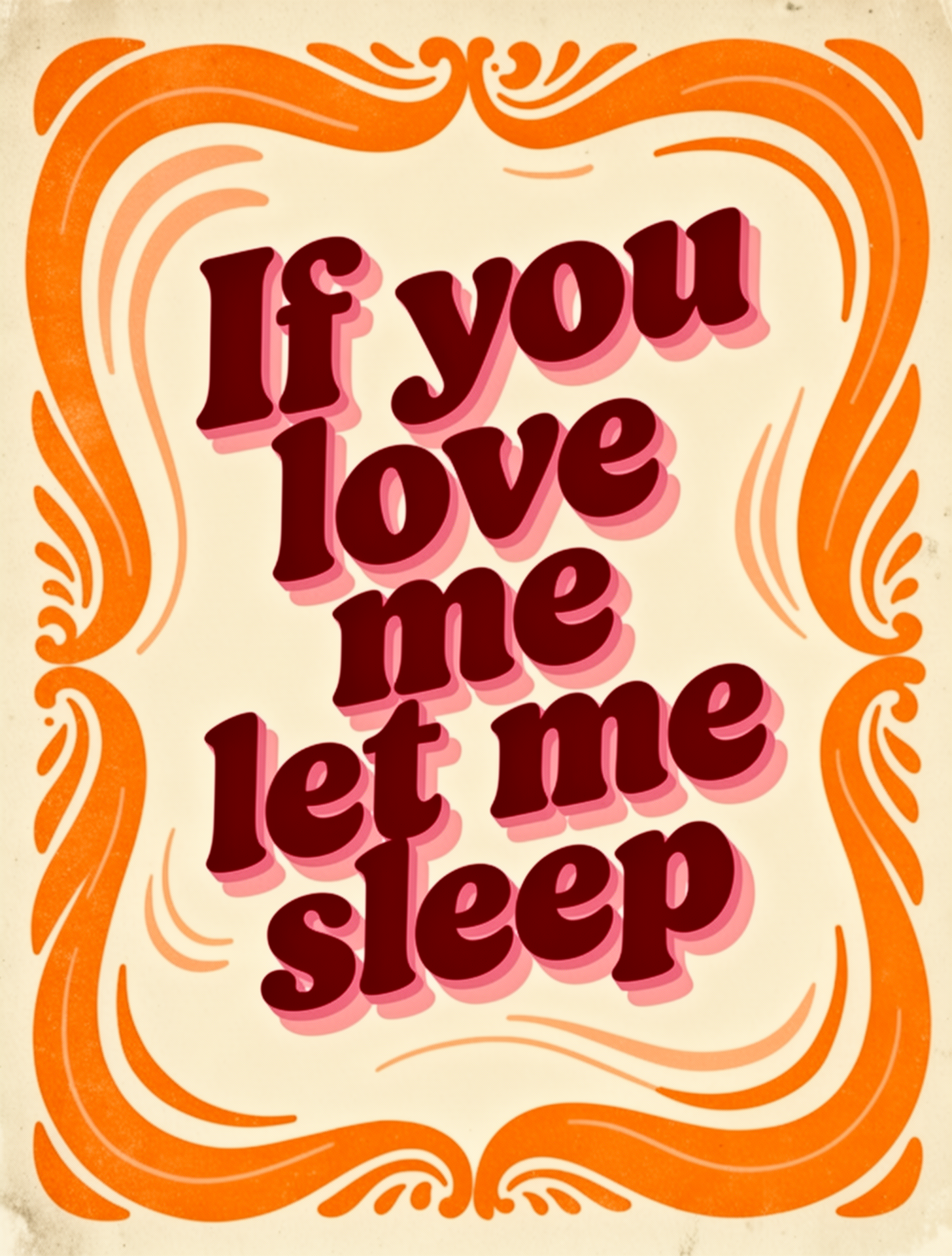
## Typography and Design

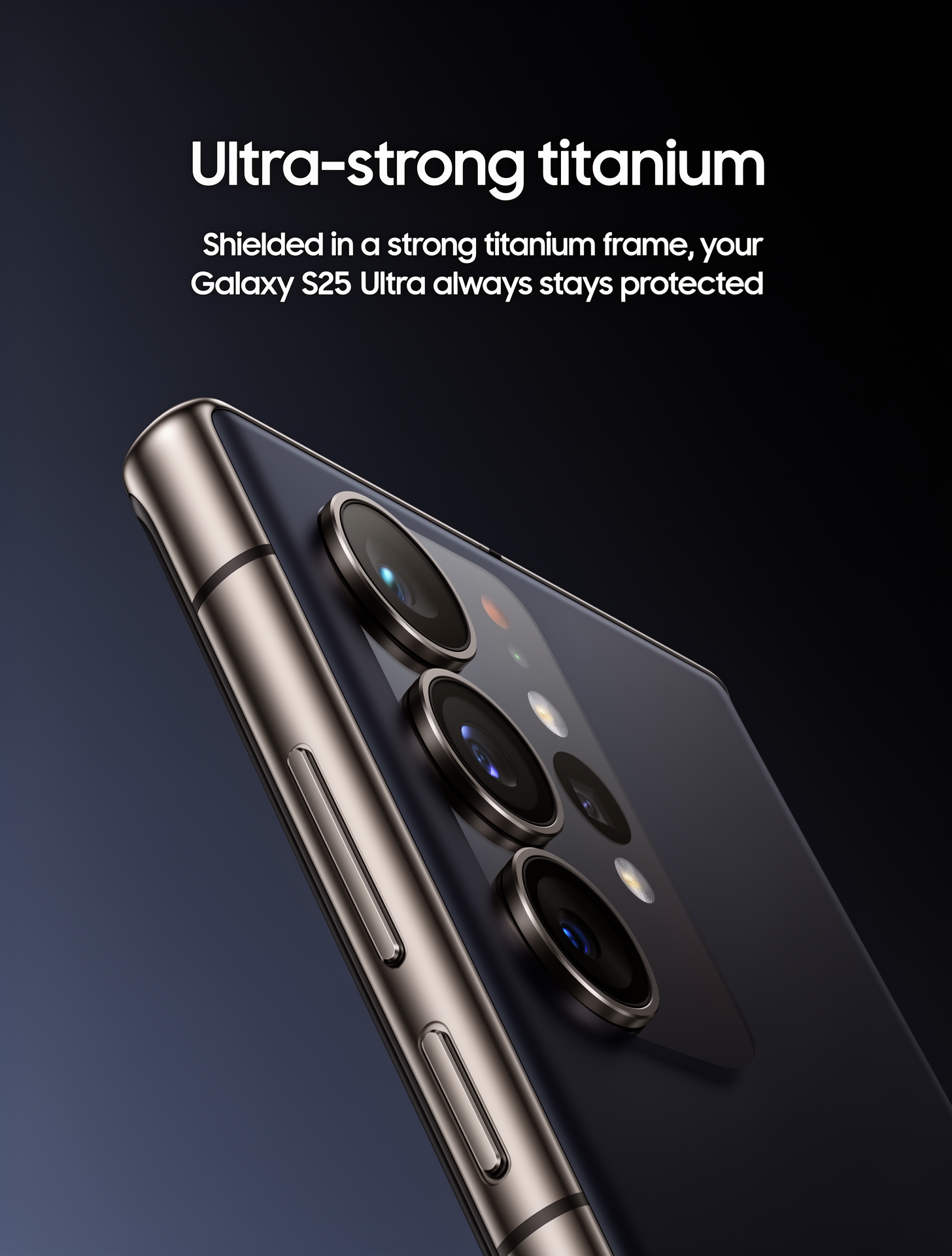
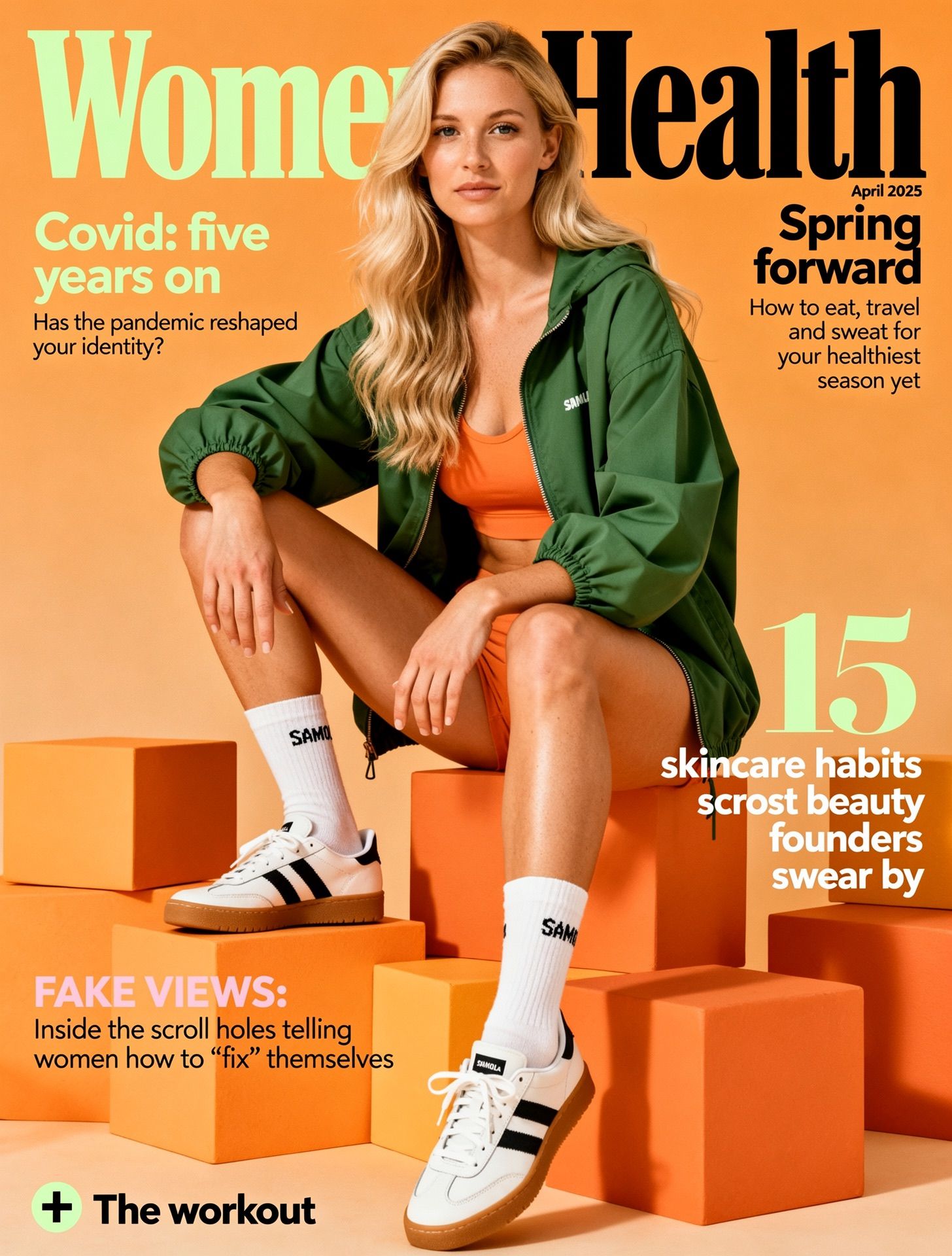
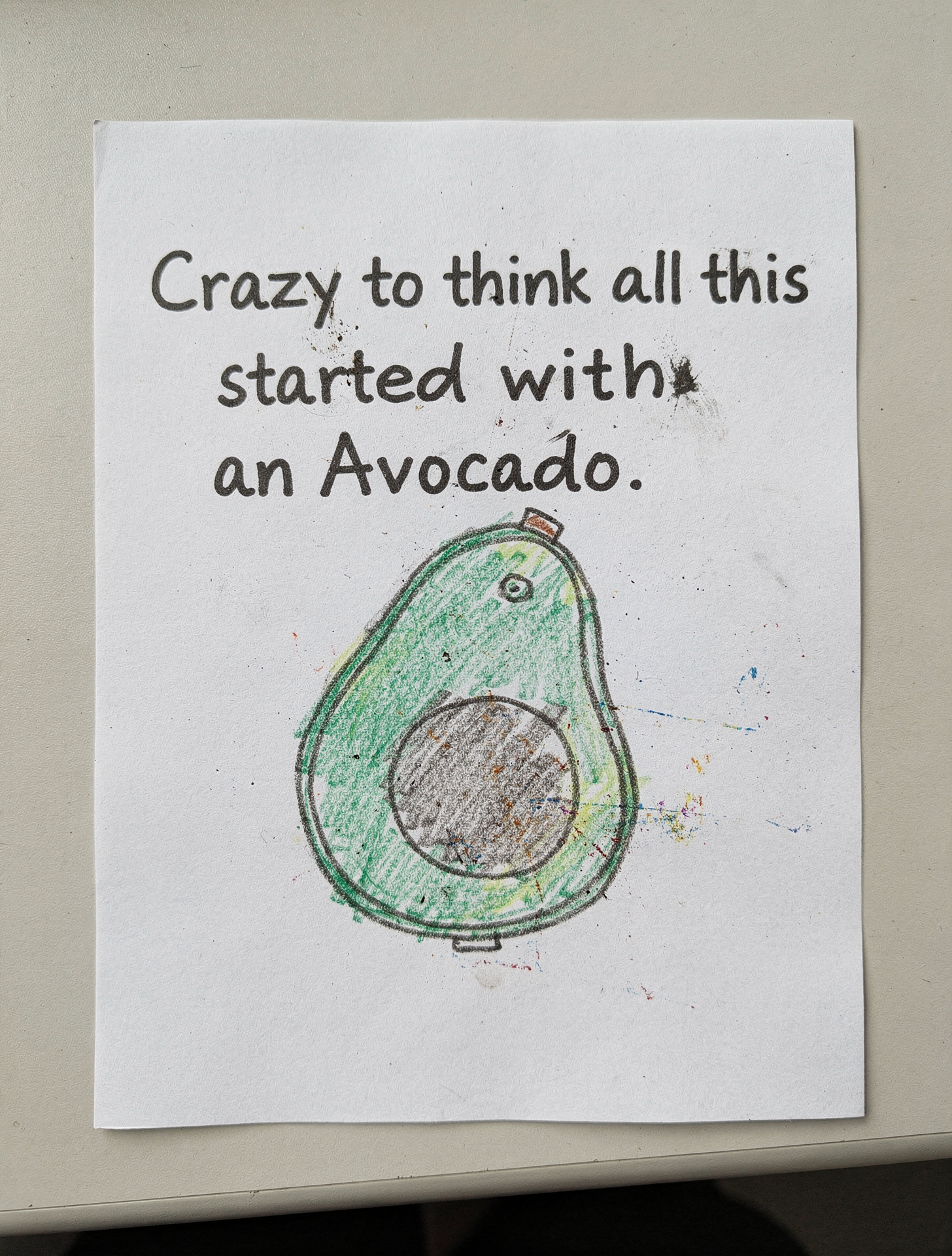
FLUX.2 generates clean typography, product marketing materials, and magazine layouts.

<Tabs>
  <Tab title="Product Advertisement">
    <Frame>
      <img src="https://cdn.sanity.io/images/2gpum2i6/production/7730d0482ee19d0d3207b5cbbb55074c3b66d554-1456x1920.png" alt="Phone advertisement" style={{ maxWidth:"420px",margin:"0 auto",display:"block" }} />
    </Frame>

    <PromptDisplay prompt="Samsung Galaxy S25 Ultra product advertisement, 'Ultra-strong titanium' headline, 'Shielded in a strong titanium frame, your Galaxy S25 Ultra always stays protected' subtext, close-up of phone edge showing titanium frame, dark gradient background, clean minimalist tech aesthetic, professional product photography" />
  </Tab>

  <Tab title="Magazine Cover">
    <Frame>
      <img src="https://cdn.sanity.io/images/2gpum2i6/production/00ddd4ce8b582891f3b174462dc635dac4e45d46-1456x1920.jpg" alt="Women's Health magazine cover" style={{ maxWidth:"420px",margin:"0 auto",display:"block" }} />
    </Frame>

    <PromptDisplay prompt="Women's Health magazine cover, April 2025 issue, 'Spring forward' headline, woman in green outfit sitting on orange blocks, white sneakers, 'Covid: five years on' feature text, '15 skincare habits' callout, professional editorial photography, magazine layout with multiple text elements" />
  </Tab>

  <Tab title="White Paper Poster">
    <Frame>
      <img src="https://cdn.sanity.io/images/2gpum2i6/production/a49333f6507b4c68370cb20421c150fb9747f348-1456x1920.png" alt="White paper poster with avocado quote" style={{ maxWidth:"420px",margin:"0 auto",display:"block" }} />
    </Frame>

    <PromptDisplay prompt={'A White Paper with the Text "Crazy to think all this started with an Avocado." and a really bad drawing with diffusion artifacts of an avocado'} />
  </Tab>

  <Tab title="Groovy Retro Poster">
    <Frame>
      <img src="https://cdn.sanity.io/images/2gpum2i6/production/6d99bf4508c927ab16b67359b6ff70cdc992b279-1456x1920.png" alt="Groovy retro poster with sleep quote" style={{ maxWidth:"420px",margin:"0 auto",display:"block" }} />
    </Frame>

    <PromptDisplay prompt={'Groovy retro poster with the quote "If you love me let me sleep". Bold 70s typography in deep red and warm pink tones. Cream background and bold orange doodle around the text. Funky layout with playful shadow. Style: bold vintage aesthetic, dopamine decor'} />
  </Tab>
</Tabs>

### Text Rendering Tips

FLUX.2 can generate readable text when you describe it clearly:

* **Use quotation marks**: *"The text 'OPEN' appears in red neon letters above the door"*
* **Specify placement**: Where text appears relative to other elements
* **Describe style**: "elegant serif typography", "bold industrial lettering", "handwritten script"
* **Font size**: "large headline text", "small body copy", "medium subheading"
* **Color**: Use hex codes for brand text: *"The logo text 'ACME' in color #FF5733"*

<Tabs>
  <Tab title="Quotation marks">
    !['Open' neon sign](https://cdn.sanity.io/images/2gpum2i6/production/324a5024e679ee8a693821fc5bbdedb2c3fde129-1888x1056.png)

    <PromptDisplay prompt="An Entry of a Sushi Restaurant, The text ‘OPEN’ appears in red neon letters above the door" />
  </Tab>

  <Tab title="Specify placement">
    <Columns cols={2}>
      <Frame caption="Before">
        ![Women's Health magazine cover](https://cdn.sanity.io/images/2gpum2i6/production/75607f4d87ab629f86de4685fcbdf632718df442-1461x1095.jpg)
      </Frame>

      <Frame caption="After">
        ![Women's Health magazine cover](https://cdn.sanity.io/images/2gpum2i6/production/721e3812245eb5d596502e1a4afca4229ee24484-1440x1072.jpg)
      </Frame>
    </Columns>

    <PromptDisplay prompt={'Add the text "By Black Forest Labs" below the main text in the middle of the book'} />
  </Tab>

  <Tab title="Describe style">
    <Columns cols={2}>
      <Frame caption="Before">
        ![Women's Health magazine cover](https://cdn.sanity.io/images/2gpum2i6/production/00ddd4ce8b582891f3b174462dc635dac4e45d46-1456x1920.jpg)
      </Frame>

      <Frame caption="After">
        ![Women's Health magazine cover](https://cdn.sanity.io/images/2gpum2i6/production/3817a3329e40f065cde30b1df2328cb01c753295-1088x1440.jpg)
      </Frame>
    </Columns>

    <PromptDisplay prompt={'Add the text "Black Forest Labs" in vibrant coral/orange, positioned center, ultra-bold decorative serif font, slight vintage poster feel.'} />
  </Tab>
</Tabs>

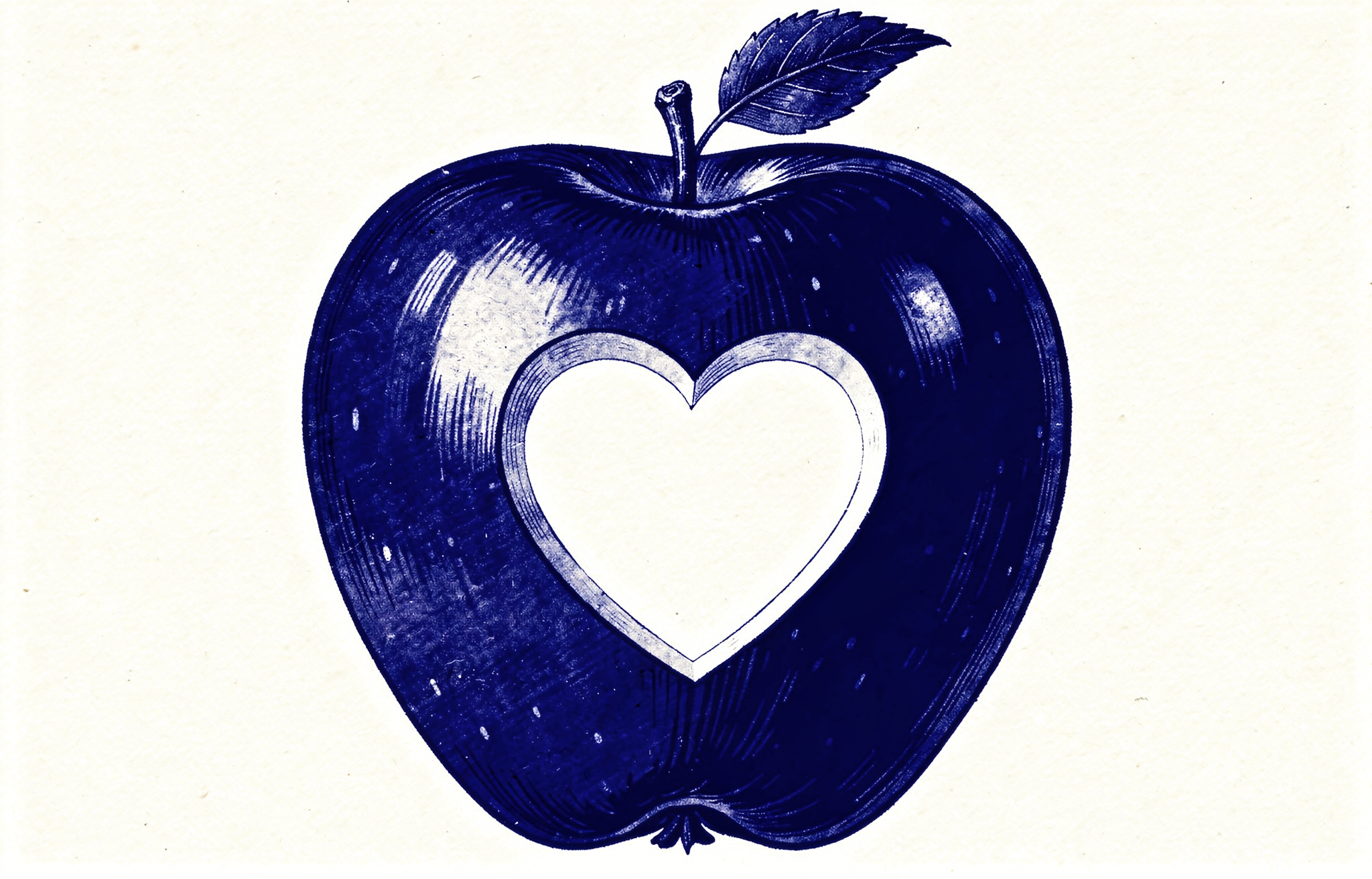
## HEX Color Code Prompting

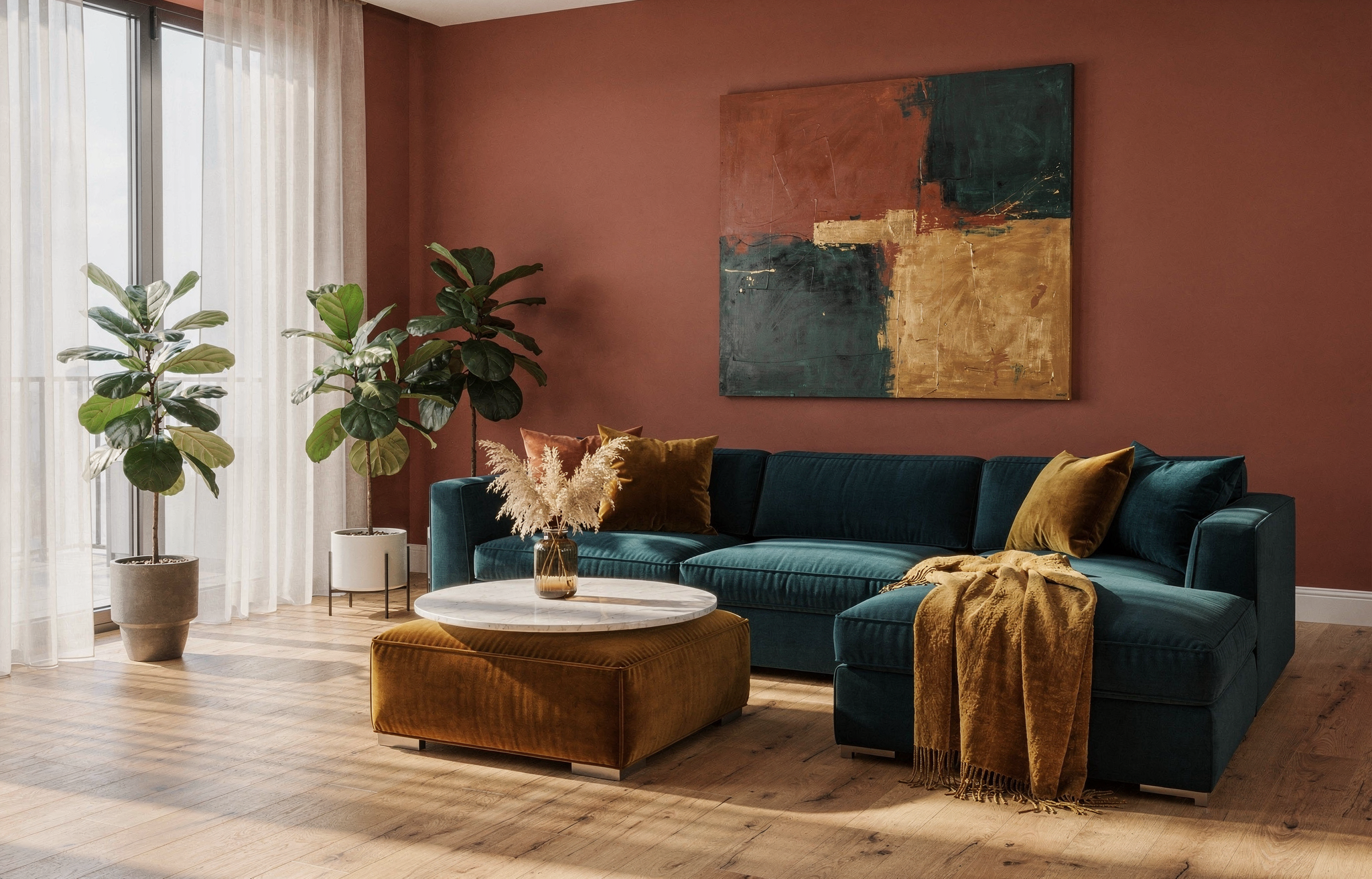
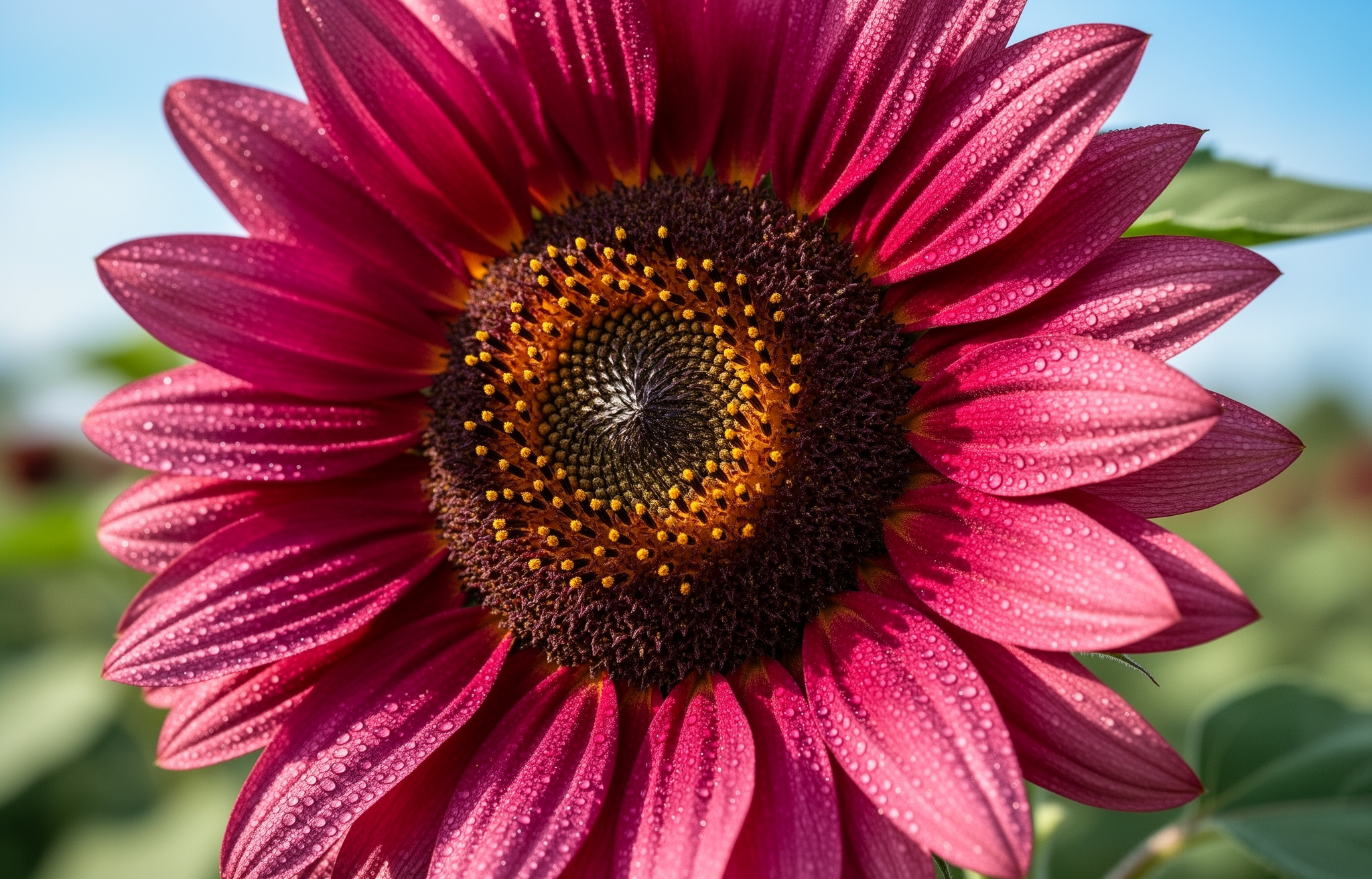
FLUX.2 supports precise color matching using hex codes. Useful for brand consistency and design work.

### Basic Syntax

Signal hex colors with keywords like "color" or "hex" followed by the code:

<Tabs>
  <Tab title="Apple Illustration">
    <Frame>
      <img src="https://cdn.sanity.io/images/2gpum2i6/production/bf14460ae86f1758ac515d8919f7dd25fad01f32-2048x1312.png" alt="Basic hex color syntax example with blue apple illustration" style={{ maxWidth:"620px",margin:"0 auto",display:"block" }} />
    </Frame>

    <div style={{ marginTop: 8, marginBottom: 8 }}>
      <span style={{ display: "inline-flex", alignItems: "center", gap: 8, marginRight: 12, marginBottom: 8 }}>
        <span aria-hidden="true" style={{ width: 12, height: 12, borderRadius: 999, backgroundColor: "#0047AB", border: "1px solid #d1d5db", display: "inline-block", flexShrink: 0 }} />

        <code>Apple: #0047AB</code>
      </span>
    </div>

    <PromptDisplay prompt="a vintage illustration of an apple in color #0047AB with a heart-shaped cutout in the middle, on a white background" />
  </Tab>

  <Tab title="Livingroom">
    <Frame>
      <img src="https://cdn.sanity.io/images/2gpum2i6/production/265f7e1133ab7918aa4462edb35ed588944bc818-2048x1312.png" alt="Brand color example" style={{ maxWidth:"620px",margin:"0 auto",display:"block" }} />
    </Frame>

    <div style={{ marginTop: 8 }}>
      <span style={{ display: "inline-flex", alignItems: "center", gap: 8, marginRight: 12, marginBottom: 8 }}>
        <span aria-hidden="true" style={{ width: 12, height: 12, borderRadius: 999, backgroundColor: "#C4725A", border: "1px solid #d1d5db", display: "inline-block", flexShrink: 0 }} />

        <code>Walls: #C4725A</code>
      </span>

      <span style={{ display: "inline-flex", alignItems: "center", gap: 8, marginRight: 12, marginBottom: 8 }}>
        <span aria-hidden="true" style={{ width: 12, height: 12, borderRadius: 999, backgroundColor: "#1B6B6F", border: "1px solid #d1d5db", display: "inline-block", flexShrink: 0 }} />

        <code>Sofa: #1B6B6F</code>
      </span>

      <span style={{ display: "inline-flex", alignItems: "center", gap: 8, marginRight: 12, marginBottom: 8 }}>
        <span aria-hidden="true" style={{ width: 12, height: 12, borderRadius: 999, backgroundColor: "#E8A847", border: "1px solid #d1d5db", display: "inline-block", flexShrink: 0 }} />

        <code>Accent: #E8A847</code>
      </span>
    </div>

    <PromptDisplay prompt="A modern living room with warm terracotta walls in hex #C4725A, a large L-shaped sectional sofa in deep teal hex #1B6B6F, and golden amber hex #E8A847 accent pillows, throw blanket, and a velvet ottoman. Light oak hardwood floors, a round marble coffee table with dried pampas grass in a glass vase, floor-to-ceiling windows with sheer white curtains letting in soft afternoon light, two potted fiddle leaf figs, and an abstract painting on the main wall featuring all three accent colors. Clean minimal composition, natural daylight casting soft shadows across the room." />
  </Tab>

  <Tab title="Sunflower">
    <Frame>
      <img src="https://cdn.sanity.io/images/2gpum2i6/production/977e4a3c8503701440bcd2b396816b218436615c-2048x1312.png" alt="Sunflower with hex color prompting" style={{ maxWidth:"620px",margin:"0 auto",display:"block" }} />
    </Frame>

    <div style={{ marginTop: 8 }}>
      <span style={{ display: "inline-flex", alignItems: "center", gap: 8, marginRight: 12, marginBottom: 8 }}>
        <span aria-hidden="true" style={{ width: 12, height: 12, borderRadius: 999, backgroundColor: "#C92695", border: "1px solid #d1d5db", display: "inline-block", flexShrink: 0 }} />

        <code>Sunflower: #C92695</code>
      </span>
    </div>

    <PromptDisplay prompt="sunflower in color #C92695" />
  </Tab>
</Tabs>

### Gradient Colors

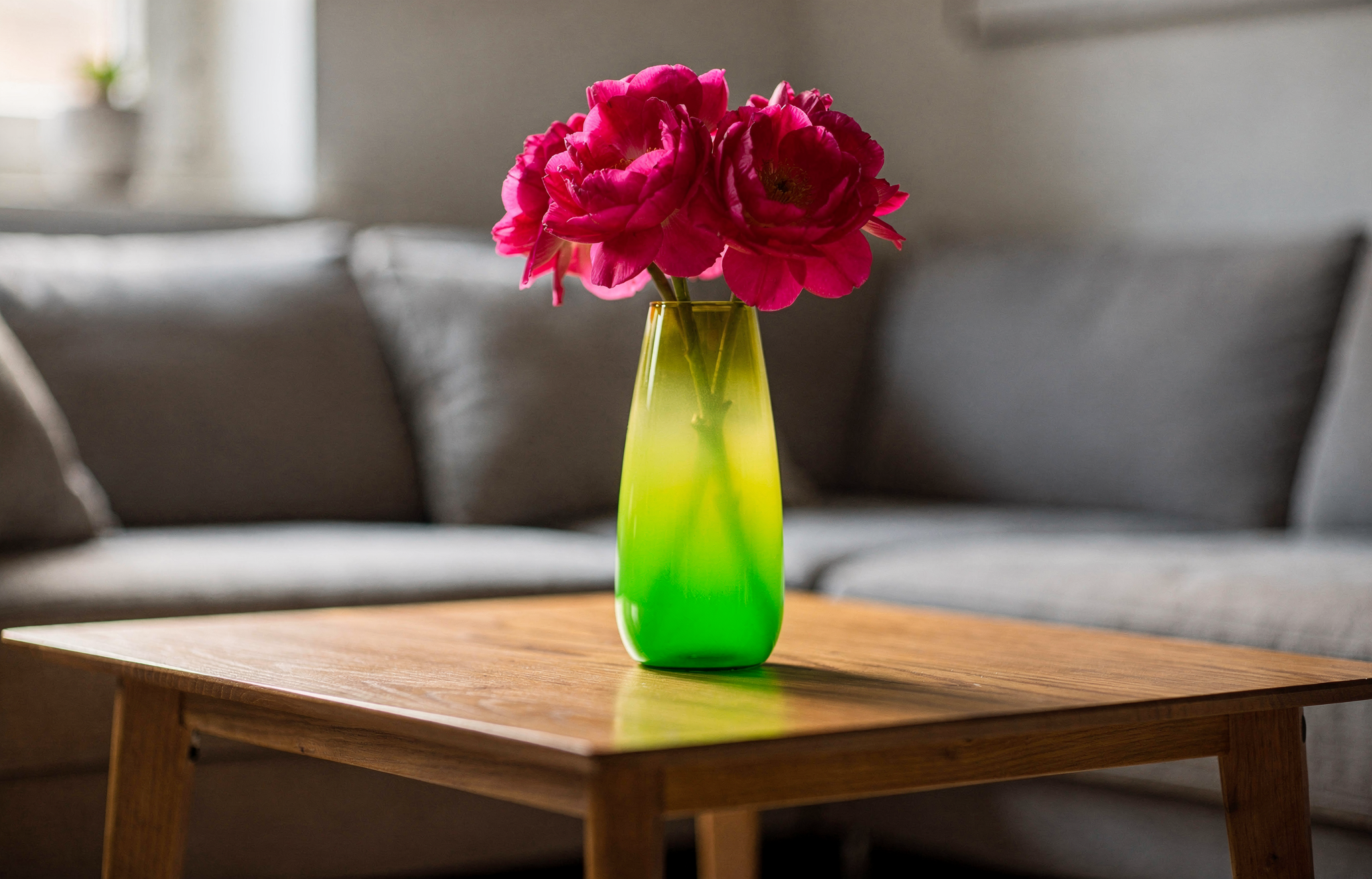
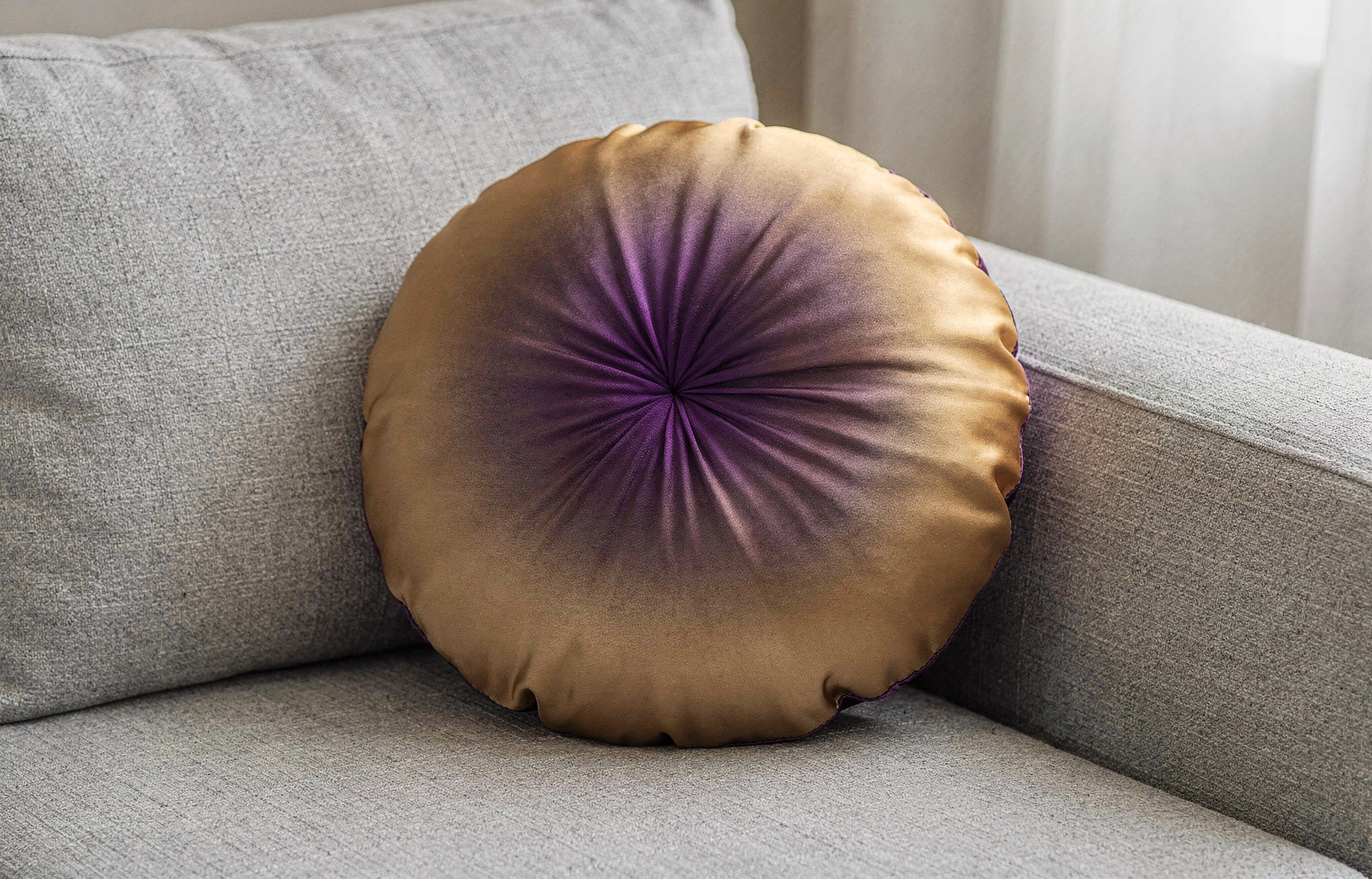
Apply gradients by specifying start and end colors:

<Tabs>
  <Tab title="Vase Gradient">
    <Frame>
      <img src="https://cdn.sanity.io/images/2gpum2i6/production/16d60384340172110e73d3f9a135c2c8318b1189-2048x1312.png" alt="Vase with gradient colors" style={{ maxWidth:"620px",margin:"0 auto",display:"block" }} />
    </Frame>

    <div style={{ marginTop: 8 }}>
      <span style={{ display: "inline-flex", alignItems: "center", gap: 8, marginRight: 12, marginBottom: 8 }}>
        <span aria-hidden="true" style={{ width: 12, height: 12, borderRadius: 999, backgroundColor: "#02eb3c", border: "1px solid #d1d5db", display: "inline-block", flexShrink: 0 }} />

        <code>Gradient start: #02eb3c</code>
      </span>

      <span style={{ display: "inline-flex", alignItems: "center", gap: 8, marginRight: 12, marginBottom: 8 }}>
        <span aria-hidden="true" style={{ width: 12, height: 12, borderRadius: 999, backgroundColor: "#edfa3c", border: "1px solid #d1d5db", display: "inline-block", flexShrink: 0 }} />

        <code>Gradient end: #edfa3c</code>
      </span>

      <span style={{ display: "inline-flex", alignItems: "center", gap: 8, marginRight: 12, marginBottom: 8 }}>
        <span aria-hidden="true" style={{ width: 12, height: 12, borderRadius: 999, backgroundColor: "#ff0088", border: "1px solid #d1d5db", display: "inline-block", flexShrink: 0 }} />

        <code>Flowers: #ff0088</code>
      </span>
    </div>

    <PromptDisplay prompt="A vase on a table in living room, the color of the vase is a gradient, starting with color #02eb3c and finishing with color #edfa3c. The flowers inside the vase have the color #ff0088" />
  </Tab>

  <Tab title="Pillow Gradient">
    <Frame>
      <img src="https://cdn.sanity.io/images/2gpum2i6/production/234a2b1db9d33bde2feb84677b3593472bb224bb-2048x1312.png" alt="Round silk throw pillow with radial gradient" style={{ maxWidth:"620px",margin:"0 auto",display:"block" }} />
    </Frame>

    <div style={{ marginTop: 8 }}>
      <span style={{ display: "inline-flex", alignItems: "center", gap: 8, marginRight: 12, marginBottom: 8 }}>
        <span aria-hidden="true" style={{ width: 12, height: 12, borderRadius: 999, backgroundColor: "#6A0DAD", border: "1px solid #d1d5db", display: "inline-block", flexShrink: 0 }} />

        <code>Center: #6A0DAD</code>
      </span>

      <span style={{ display: "inline-flex", alignItems: "center", gap: 8, marginRight: 12, marginBottom: 8 }}>
        <span aria-hidden="true" style={{ width: 12, height: 12, borderRadius: 999, backgroundColor: "#FFD700", border: "1px solid #d1d5db", display: "inline-block", flexShrink: 0 }} />

        <code>Edges: #FFD700</code>
      </span>
    </div>

    <PromptDisplay prompt="A round silk throw pillow resting on a light gray linen sofa, the fabric of the pillow shows a radial gradient from rich purple (#6A0DAD) at the center fading outward to warm gold (#FFD700) at the edges, even ambient indoor lighting, close-up perspective." />
  </Tab>

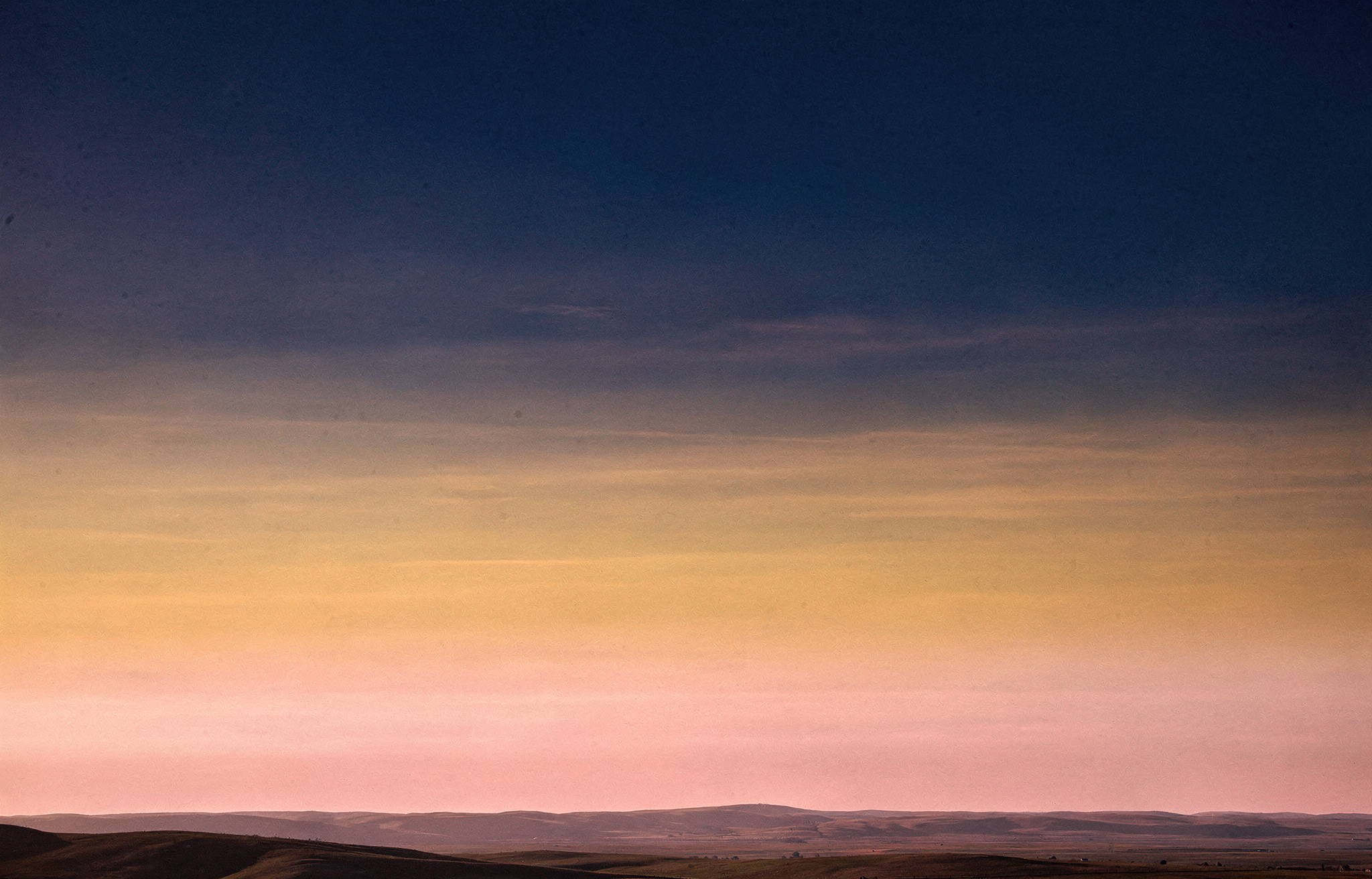
  <Tab title="Sky Gradient">
    <Frame>
      <img src="https://cdn.sanity.io/images/2gpum2i6/production/cbe5e55d89bcb1aff61124e60091034eadc58e40-2048x1312.png" alt="Panoramic sky with three horizontal gradient color zones" style={{ maxWidth:"620px",margin:"0 auto",display:"block" }} />
    </Frame>

    <div style={{ marginTop: 8 }}>
      <span style={{ display: "inline-flex", alignItems: "center", gap: 8, marginRight: 12, marginBottom: 8 }}>
        <span aria-hidden="true" style={{ width: 12, height: 12, borderRadius: 999, backgroundColor: "#1B0A3E", border: "1px solid #d1d5db", display: "inline-block", flexShrink: 0 }} />

        <code>Upper sky: #1B0A3E</code>
      </span>

      <span style={{ display: "inline-flex", alignItems: "center", gap: 8, marginRight: 12, marginBottom: 8 }}>
        <span aria-hidden="true" style={{ width: 12, height: 12, borderRadius: 999, backgroundColor: "#CF6A2E", border: "1px solid #d1d5db", display: "inline-block", flexShrink: 0 }} />

        <code>Middle sky: #CF6A2E</code>
      </span>

      <span style={{ display: "inline-flex", alignItems: "center", gap: 8, marginRight: 12, marginBottom: 8 }}>
        <span aria-hidden="true" style={{ width: 12, height: 12, borderRadius: 999, backgroundColor: "#E8728A", border: "1px solid #d1d5db", display: "inline-block", flexShrink: 0 }} />

        <code>Horizon glow: #E8728A</code>
      </span>
    </div>

    <PromptDisplay prompt="A wide panoramic view of a vast open sky stretching above a flat horizon line hills. The sky fills the entire frame and displays three distinct horizontal color zones blending smoothly into each other. The upper portion of the sky is deep indigo (#1B0A3E), gradually transitioning through the middle into a warm burnt amber (#CF6A2E), and the lowest section near the horizon glows in soft rose pink (#E8728A)." />
  </Tab>
</Tabs>

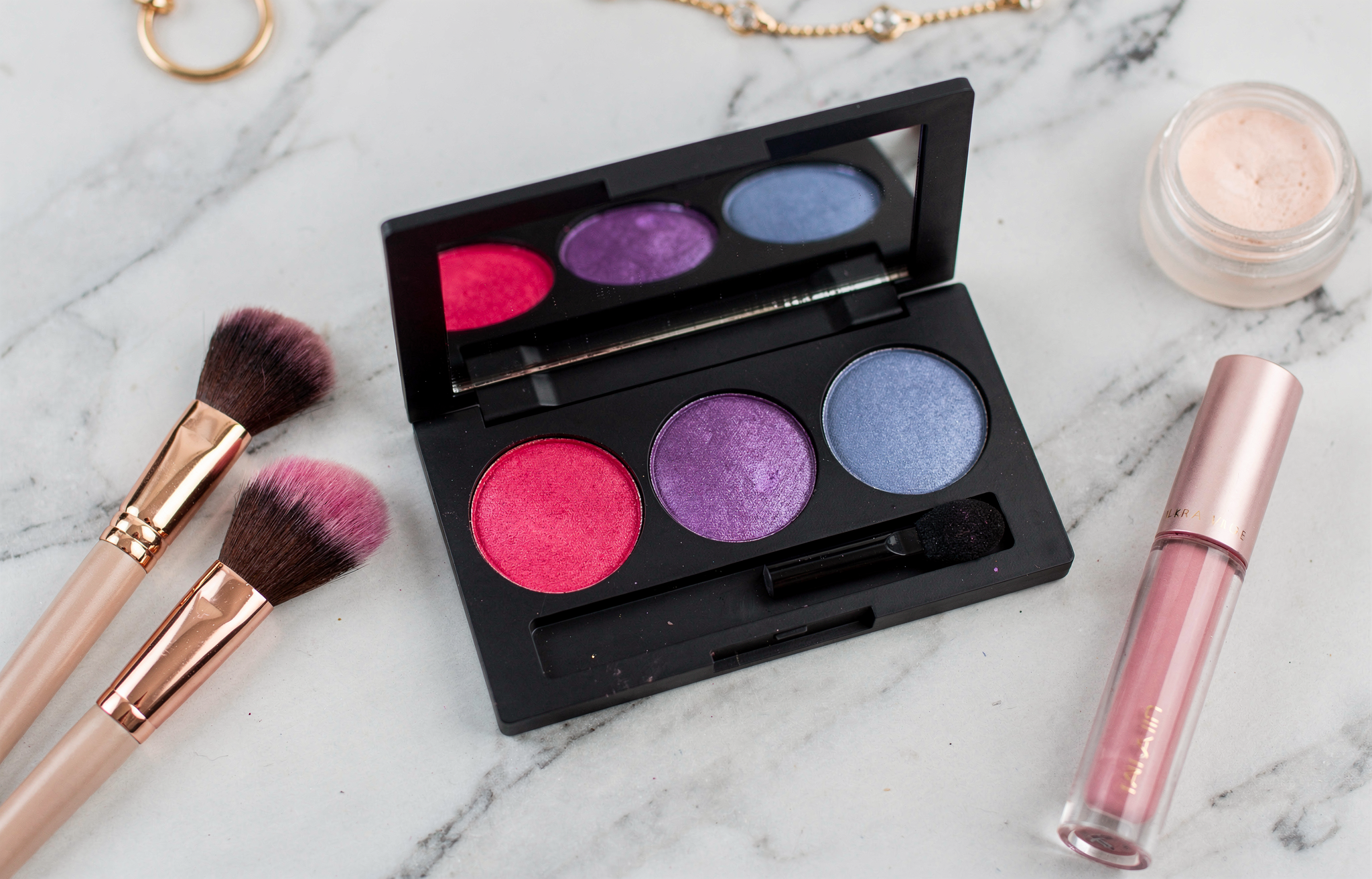
### Color in JSON Prompts

Combine hex colors with structured prompts for maximum control:

```json theme={null}
{
  "scene": "Makeup flat lay on marble surface",
  "subjects": [
    {
      "description": "eyeshadow palette",
      "colors": ["#E91E63", "#9C27B0", "#673AB7", "#3F51B5"]
    }
  ],
  "style": "beauty product photography",
  "lighting": "soft diffused overhead lighting"
}
```

<Frame>
  <img src="https://cdn.sanity.io/images/2gpum2i6/production/ca26b80d90e298223c4f1f5d27cbe4ac9da298f2-2048x1312.png" alt="Color in JSON prompts example output" style={{ maxWidth:"620px",margin:"0 auto",display:"block" }} />
</Frame>

<div style={{ marginTop: 8, marginBottom: 8 }}>
  <span style={{ display: "inline-flex", alignItems: "center", gap: 8, marginRight: 12, marginBottom: 8 }}>
    <span aria-hidden="true" style={{ width: 12, height: 12, borderRadius: 999, backgroundColor: "#E91E63", border: "1px solid #d1d5db", display: "inline-block", flexShrink: 0 }} />

    <code>#E91E63</code>
  </span>

  <span style={{ display: "inline-flex", alignItems: "center", gap: 8, marginRight: 12, marginBottom: 8 }}>
    <span aria-hidden="true" style={{ width: 12, height: 12, borderRadius: 999, backgroundColor: "#9C27B0", border: "1px solid #d1d5db", display: "inline-block", flexShrink: 0 }} />

    <code>#9C27B0</code>
  </span>

  <span style={{ display: "inline-flex", alignItems: "center", gap: 8, marginRight: 12, marginBottom: 8 }}>
    <span aria-hidden="true" style={{ width: 12, height: 12, borderRadius: 999, backgroundColor: "#673AB7", border: "1px solid #d1d5db", display: "inline-block", flexShrink: 0 }} />

    <code>#673AB7</code>
  </span>

  <span style={{ display: "inline-flex", alignItems: "center", gap: 8, marginRight: 12, marginBottom: 8 }}>
    <span aria-hidden="true" style={{ width: 12, height: 12, borderRadius: 999, backgroundColor: "#3F51B5", border: "1px solid #d1d5db", display: "inline-block", flexShrink: 0 }} />

    <code>#3F51B5</code>
  </span>
</div>

<Warning>
  Hex codes work best when clearly associated with specific objects. Vague references like "use #FF0000 somewhere" may produce inconsistent results.
</Warning>

## Infographics and Data Visualization

FLUX.2 can generate infographics with clean typography and structured layouts.

### Infographic Template

```json theme={null}
{
  "type": "infographic",
  "title": "Your Main Title",
  "subtitle": "Supporting context",
  "sections": [
    {
      "heading": "Section 1",
      "content": "Key information",
      "visual": "icon or chart type"
    }
  ],
  "color_scheme": ["#primary", "#secondary", "#accent"],
  "style": "modern, clean, corporate"
}
```

**Example Prompt:**

*"Create a vertical infographic about coffee consumption worldwide. Title: 'Global Coffee Culture'. Include 3 sections with statistics, use icons for each country, color scheme #4A2C2A (brown) and #F5E6D3 (cream). Modern minimalist style with clean typography."*

<Frame caption="Data visualization with clean typography">
  ![Infographic example](https://cdn.sanity.io/images/2gpum2i6/production/2355f71eb41d1da454ef3c1b820b3d7ce644bd16-1920x1920.jpg)
</Frame>

## Multi-Language Prompting

FLUX.2 understands multiple languages. Prompt in your native language for more culturally authentic results.

<Tabs>
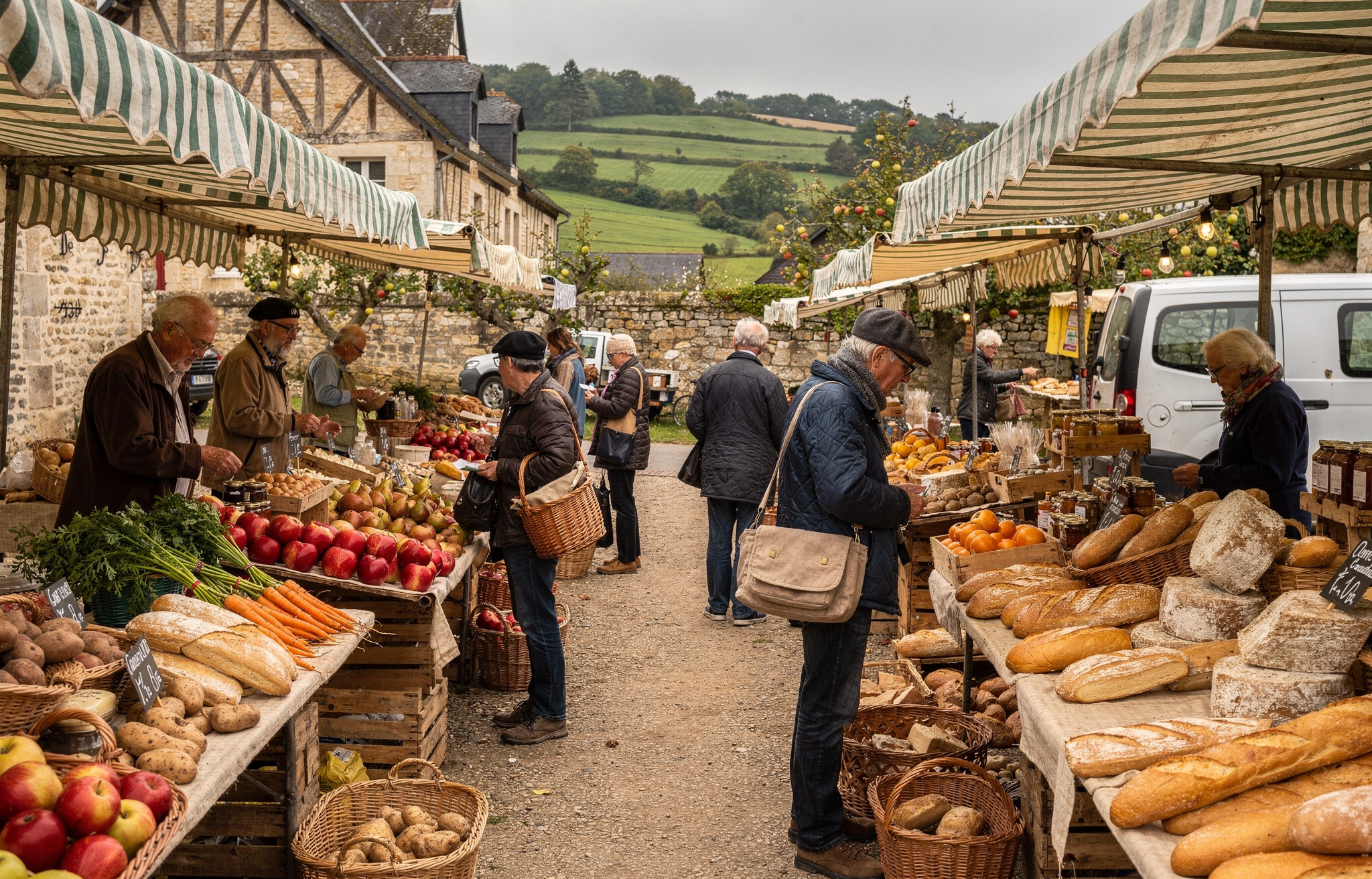
  <Tab title="French">
    <Frame>
      <img src="https://cdn.sanity.io/images/2gpum2i6/production/75b4ec7dcf50c3731e820524f5bf863666cb1d45-2048x1312.png" alt="French prompt: Normandy countryside food market at sunrise" style={{ maxWidth:"620px",margin:"0 auto",display:"block" }} />
    </Frame>

    <PromptDisplay prompt="Un marché alimentaire dans la campagne normande" />
  </Tab>

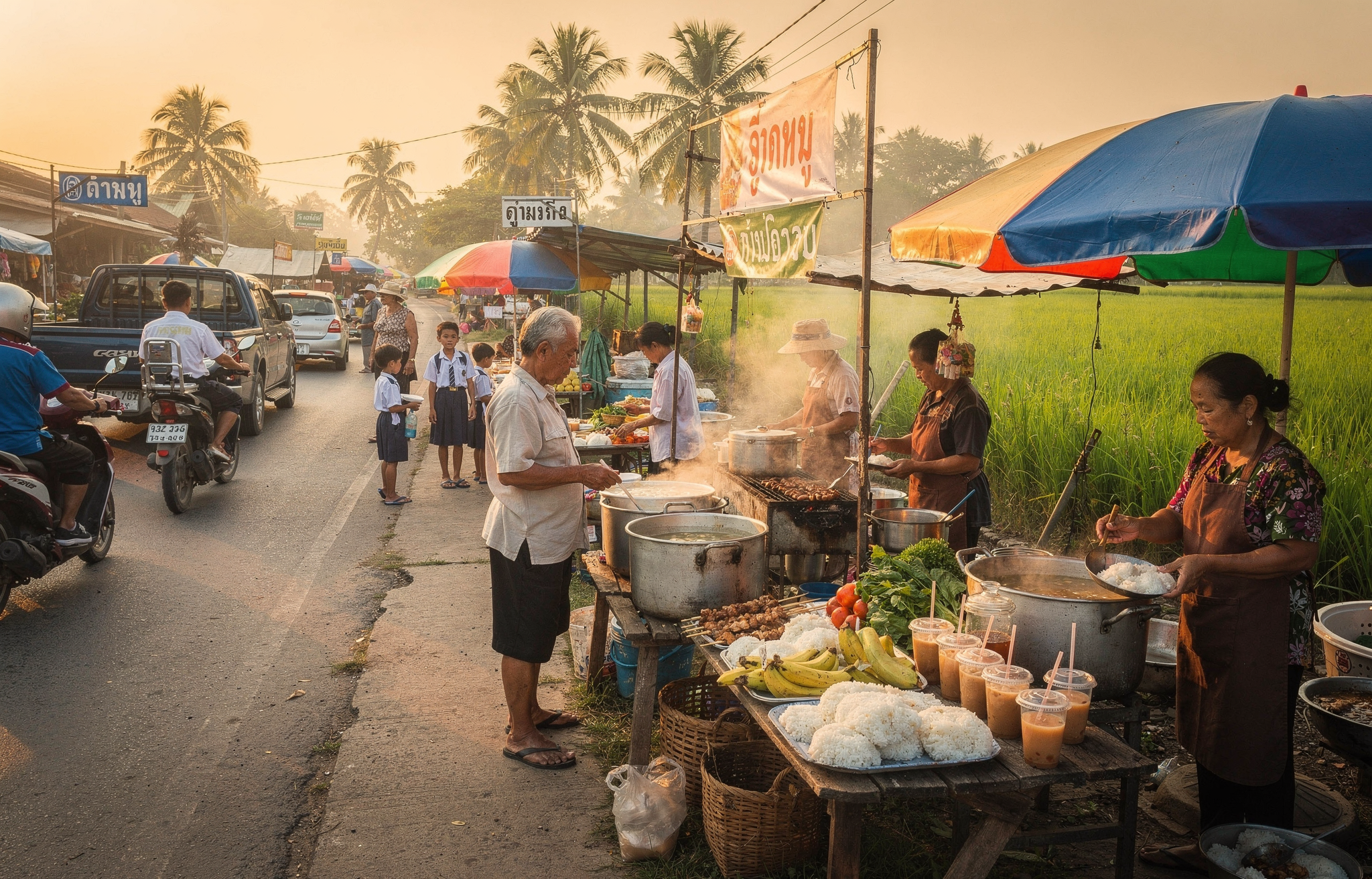
  <Tab title="Thai">
    <Frame>
      <img src="https://cdn.sanity.io/images/2gpum2i6/production/037e6af1fe70de7771a05191dccd77287ca350ff-2048x1312.png" alt="Thai prompt: Morning food market in rural Bangkok area" style={{ maxWidth:"620px",margin:"0 auto",display:"block" }} />
    </Frame>

    <PromptDisplay prompt="ตลาดอาหารเช้าในชนบทใกล้กรุงเทพฯ" />
  </Tab>

  <Tab title="Korean">
    <Frame>
      <img src="https://cdn.sanity.io/images/2gpum2i6/production/7f2516c4ed39b0a7ffcf2919278cd37682a8125c-2048x1312.png" alt="Korean prompt: Seoul rooftop garden at sunset" style={{ maxWidth:"620px",margin:"0 auto",display:"block" }} />
    </Frame>

    <PromptDisplay prompt="서울 도심의 옥상 정원, 저녁 노을이 지는 하늘" />
  </Tab>
</Tabs>

<Tip>
  Prompting in the native language of the content you're creating often produces more culturally authentic results - local markets, architecture, and atmosphere are rendered with greater accuracy.
</Tip>

## Comic Strips and Sequential Art

Create consistent comic panels with character continuity. The key is to define your character in detail and maintain that description across panels.

### The Diffusion Man Story

Generate each panel separately while keeping character descriptions consistent:

<Columns cols={2}>
  <Frame caption="Panel 1: The Crisis">
    ![Worried scientist in server room](https://cdn.sanity.io/images/2gpum2i6/production/ff4d90d49054184073fcf25b86ac9bcb96f0eb41-1440x832.jpg)
  </Frame>

  <Frame caption="Panel 2: The Transformation">
    ![Diffusion Man transformation](https://cdn.sanity.io/images/2gpum2i6/production/7b767ce5259d743e8e98e408e47f9c75fb285882-1440x832.jpg)
  </Frame>
</Columns>

<Columns cols={2}>
  <Frame caption="Panel 3: The Battle">
    ![Diffusion Man fighting corrupted code](https://cdn.sanity.io/images/2gpum2i6/production/c146397a89b81fad8af3c246132bcf6163f68af3-1328x800.jpg)
  </Frame>

  <Frame caption="Panel 4: Victory">
    ![Diffusion Man victorious](https://cdn.sanity.io/images/2gpum2i6/production/2630c974542af56eb8d894f394c340fdf2fd2004-1440x832.jpg)
  </Frame>
</Columns>

<AccordionGroup>
  <Accordion title="Panel 1 Prompt: The Crisis">
    *"Style: Classic superhero comic Character: Worried scientist frantically typing on glowing holographic keyboard, face illuminated by blue light showing deep concern Setting: Massive computer server room with sparking circuits and red warning lights flashing on monitors Text: 'The AI models are corrupting! We need Diffusion Man!' Mood: Tense, urgent + dramatic blue and red tones"*
  </Accordion>

  <Accordion title="Panel 2 Prompt: The Transformation">
    *"Style: Classic superhero comic with dynamic action lines and electric energy effects Character: Diffusion Man/Mild-mannered programmer (30 years old, brown skin tone, short natural fade haircut with black hair, black-framed glasses, light blue button-up shirt, athletic build, strong jawline) body begins to glow with swirling gradients of deep purple, electric blue, and hot pink energy, mathematical equations and neural network patterns flowing around him in glowing lines Setting: Small office with computer monitors displaying code and error messages Text: 'When noise becomes signal, I am... DIFFUSION MAN!' Mood: Powerful, transformative + dramatic backlighting and energy radiating outward in waves"*
  </Accordion>

  <Accordion title="Panel 3 Prompt: The Battle">
    *"Style: Classic superhero comic with explosive action and dynamic composition Character: Diffusion Man (athletic 30-year-old with brown skin tone and short natural fade haircut with black hair, wearing sleek bodysuit with gradient patterns from deep purple to electric blue to hot pink, glowing neural network emblem on chest with interconnected nodes, short gradient cape, purple half-mask showing strong jawline and confident expression) extends both hands forward in powerful stance, shooting beams of structured noise and latent space energy at corrupted digital monsters made of glitching pixels and broken code Setting: Digital cyberspace environment with floating data cubes and cascading binary code Text: 'Time to DENOISE this chaos!' Mood: Intense, action-packed + bright energy flashes and electric effects"*
  </Accordion>

  <Accordion title="Panel 4 Prompt: Victory">
    *"Style: Classic superhero comic with warm, triumphant colors and clean composition Character: Diffusion Man (athletic 30-year-old with brown skin tone and short natural fade haircut with black hair, wearing sleek gradient bodysuit from deep purple to electric blue to hot pink, glowing neural network emblem on chest, short gradient cape flowing behind him, purple half-mask, strong jawline, confident heroic smile) stands heroically giving thumbs up gesture to grateful scientist beside him, her computer screens now showing stable green indicators and success messages Setting: Calm server room with soft blue ambient lighting and orderly data streams flowing smoothly in organized patterns Text: 'You saved us, Diffusion Man! The models are generating perfectly again!' Mood: Victorious, hopeful + golden sunset-like tones streaming through windows"*
  </Accordion>
</AccordionGroup>

<Tip>
  **Character Consistency**: Notice how Diffusion Man's description stays detailed and consistent across panels—brown skin tone, short natural fade haircut, gradient bodysuit from purple to blue to pink, neural network emblem, purple half-mask. Repeat these details in every panel prompt.
</Tip>

## JSON Structured Prompting

For complex scenes and production workflows, FLUX.2 interprets structured JSON prompts, giving you precise control over every aspect of your image.

**When to use JSON**:

* Production workflows requiring consistent structure
* Automation and programmatic generation
* Complex scenes with multiple subjects and relationships
* When you need to iterate on specific elements independently

**When natural language works better**:

* Quick iterations and exploration
* Simple, single-subject scenes
* When prompt length isn't a concern
* Creative workflows where flexibility matters

FLUX.2 understands both formats equally well—choose based on your workflow needs.

### The Base Schema

```json theme={null}
{
  "scene": "overall scene description",
  "subjects": [
    {
      "description": "detailed subject description",
      "position": "where in frame",
      "action": "what they're doing"
    }
  ],
  "style": "artistic style",
  "color_palette": ["#hex1", "#hex2", "#hex3"],
  "lighting": "lighting description",
  "mood": "emotional tone",
  "background": "background details",
  "composition": "framing and layout",
  "camera": {
    "angle": "camera angle",
    "lens": "lens type",
    "depth_of_field": "focus behavior"
  }
}
```

### Precise Color Control Example

Break down products into components and assign exact hex colors to each part for brand consistency:

<Columns cols={2}>
  <Frame caption="Input reference">
    ![Adidas sweatshirt reference](https://cdn.sanity.io/images/2gpum2i6/production/c74f135f2122c155ea38c747403ab0556906754c-1682x1676.jpg)
  </Frame>

  <Frame caption="Generated output with exact color matching">
    ![Adidas sweatshirt generated with precise colors](https://cdn.sanity.io/images/2gpum2i6/production/327357c01c579a3ccef7e86910dafc95e28cf6ce-1408x1408.png)
  </Frame>
</Columns>

<Accordion title="View JSON Prompt">
  ```json theme={null}
  {
    "scene": "A front-facing, studio product shot of an adidas sweatshirt, isolated on a clean white background",
    "subjects": [
      {
        "type": "Main Torso",
        "description": "The central chest and stomach panel of the sweatshirt, strictly in color #FFFFFF white",
        "position": "center body",
        "color_match": "exact"
      },
      {
        "type": "Shoulder Panels",
        "description": "The panels on the top of the shoulders (raglan style), strictly in color #000000 black",
        "position": "shoulders",
        "color_match": "exact"
      },
      {
        "type": "Sleeves",
        "description": "The long sleeves extending from the shoulder panels, strictly in color #86E04A lime green",
        "position": "arms",
        "color_match": "exact"
      },
      {
        "type": "Middle Sleeve Patch",
        "description": "Geometric rectangular patch on the middle sleeves, strictly in color #615E5E gray",
        "position": "middle sleeves",
        "color_match": "exact"
      },
      {
        "type": "Brand Logo",
        "description": "The Adidas Trefoil logo embroidered on the upper center chest, strictly in color #000000 black",
        "position": "upper chest center",
        "detail_preservation": "high"
      },
      {
        "type": "Trims and Stripes",
        "description": "The three-stripes on the sleeves, the ribbed neck collar, and the wrist cuffs, strictly in color #000000 black",
        "position": "trims",
        "color_match": "exact"
      },
      {
        "type": "Background",
        "description": "A flat, seamless white studio background, identical to the source",
        "position": "background",
        "color_match": "exact"
      }
    ],
    "color_palette": [
      "#FFFFFF",
      "#86E04A",
      "#615E5E",
      "#000000"
    ]
  }
  ```

  Each subject has a `type`, `description` with explicit color specification, `position`, and `color_match: "exact"` for precise control.
</Accordion>

### Building a Prompt Step by Step

Let's build a product shot incrementally to see how each element contributes.

**Step 1: Generating a coffee mug**

```json theme={null}
{
  "scene": "Professional studio product photography setup with polished concrete surface",
  "subjects": [
    {
      "description": "Minimalist ceramic coffee mug with steam rising from hot coffee inside",
      "pose": "Stationary on surface",
      "position": "Center foreground on polished concrete surface",
      "color_palette": ["matte black ceramic"]
    }
  ],
  "style": "Ultra-realistic product photography with commercial quality",
  "color_palette": ["matte black", "concrete gray", "soft white highlights"],
  "lighting": "Three-point softbox setup creating soft, diffused highlights with no harsh shadows",
  "mood": "Clean, professional, minimalist",
  "background": "Polished concrete surface with studio backdrop",
  "composition": "rule of thirds",
  "camera": {
    "angle": "high angle",
    "distance": "medium shot",
    "focus": "Sharp focus on steam rising from coffee and mug details",
    "lens-mm": 85,
    "f-number": "f/5.6",
    "ISO": 200
  }
}
```

<Frame caption="Step 1: Single matte black mug with steam">
  ![Professional product shot of a single black coffee mug with steam](https://cdn.sanity.io/images/2gpum2i6/production/037c25d7ee0500d7f795b7fdd7d05a6c779ff5bd-1024x768.webp)
</Frame>

**Step 2: Adding a second mug in a different color**

```json theme={null}
{
  "scene": "Professional studio product photography setup with polished concrete surface",
  "subjects": [
    {
      "description": "Minimalist ceramic coffee mug with steam rising from hot coffee inside",
      "pose": "Stationary on surface",
      "position": "Center foreground on polished concrete surface",
      "color_palette": ["matte black ceramic"]
    },
    {
      "description": "Minimalist ceramic coffee mug, matching design to the black mug",
      "pose": "Stationary on surface",
      "position": "Right side of the black mug on polished concrete surface",
      "color_palette": ["matte yellow ceramic"]
    }
  ],
  "style": "Ultra-realistic product photography with commercial quality",
  "color_palette": ["matte black", "matte yellow", "concrete gray", "soft white highlights"],
  "lighting": "Three-point softbox setup creating soft, diffused highlights with no harsh shadows",
  "mood": "Clean, professional, minimalist",
  "background": "Polished concrete surface with studio backdrop",
  "composition": "rule of thirds",
  "camera": {
    "angle": "high angle",
    "distance": "medium shot",
    "focus": "Sharp focus on steam rising from coffee and both mugs in frame",
    "lens-mm": 85,
    "f-number": "f/5.6",
    "ISO": 200
  }
}
```

<Frame caption="Step 2: Added a yellow mug to the composition">
  ![Product shot with black and yellow coffee mugs](https://cdn.sanity.io/images/2gpum2i6/production/d56be2a807b5923e15964eae6132f79bce66be22-1024x768.webp)
</Frame>

**Step 3: Change the color of the steam**

```json theme={null}
{
  "scene": "Professional studio product photography setup with polished concrete surface",
  "subjects": [
    {
      "description": "Minimalist ceramic coffee mug with bright red steam rising from hot coffee inside",
      "pose": "Stationary on surface",
      "position": "Center foreground on polished concrete surface",
      "color_palette": ["matte black ceramic", "bright red steam"]
    },
    {
      "description": "Minimalist ceramic coffee mug, matching design to the black mug",
      "pose": "Stationary on surface",
      "position": "Right side of the black mug on polished concrete surface",
      "color_palette": ["matte yellow ceramic"]
    }
  ],
  "style": "Ultra-realistic product photography with commercial quality",
  "color_palette": ["matte black", "matte yellow", "bright red", "concrete gray", "soft white highlights"],
  "lighting": "Three-point softbox setup creating soft, diffused highlights with no harsh shadows",
  "mood": "Clean, professional, minimalist",
  "background": "Polished concrete surface with studio backdrop",
  "composition": "rule of thirds",
  "camera": {
    "angle": "high angle",
    "distance": "medium shot",
    "focus": "Sharp focus on steam rising from coffee and both mugs in frame",
    "lens-mm": 85,
    "f-number": "f/5.6",
    "ISO": 200
  }
}
```

<Frame caption="Step 3: Changed the steam color to bright red">
  ![Product shot with black and yellow mugs, red steam rising from the black mug](https://cdn.sanity.io/images/2gpum2i6/production/50a2056e955f4f231e7968e69c3a89fd7d78270d-1024x768.webp)
</Frame>

<Tip>
  You can include the JSON directly in your prompt, or flatten it into natural language. FLUX.2 understands both formats.
</Tip>

## Multi-Reference Image Editing

<Note>
  \*\[pro] API has a 9MP total limit for input+output. At 1MP output you can use up to 8 reference images, at 2MP output up to 7, and so on.
</Note>

Multi-reference works well for:

* **Fashion shoots**: Combine clothing items into styled outfits
* **Interior design**: Place furniture and decor in rooms
* **Product composites**: Combine multiple products in scenes
* **Character consistency**: Maintain identity across variations

### Fashion Editorial Example (8 references)

**Prompt:** *"A spiritual architectural photograph captured on expired Kodak Ektachrome 64 slide film cross-processed from 1987 with a 35mm spherical lens at f/5.6, featuring model standing before small forest chapel in clearing. The model wears the outfit, positioned on stone steps leading to wooden chapel, red creating stark contrast against weathered brown timber. Background shows traditional Schwarzwald chapel - dark wood construction with small bell tower, carved wooden door, religious paintings under eaves, surrounding clearing with wild flowers, tall firs creating natural cathedral, small cemetery with wooden crosses. Dappled forest light at 1/125. Cross-processed Ektachrome showing extreme color shifts - cyan-magenta split, warm wood tones pushed to orange-brown, oversaturated red, crushed black shadows, blown highlights, heavy grain creating mysterious atmosphere. Composition emphasizes sacred spaces and pilgrimage. Thomas Struth church interiors, Candida Höfer architectural documentation, religious tourism meets fashion editorial, spiritual Schwarzwald mysticism."*

<Frame caption="8 input references (clothing, accessories, style elements) → combined output">
  ![Eight input reference images with generated output](https://cdn.sanity.io/images/2gpum2i6/production/51696bb4ac2972e1dda5f3e68f748210f392c4f4-4861x1863.jpg)
</Frame>

<Tip>
  For multi-reference editing, describe how each input should be used. The model combines clothing items, accessories, and style references into a cohesive scene based on your prompt.
</Tip>

## Prompt Upsampling

FLUX.2 includes a `prompt_upsampling` parameter that automatically enhances your prompt. Use it for:

* Quick iterations without crafting detailed prompts
* Exploring creative variations
* When you have a basic concept but want richer output

<Note>
  Prompt upsampling adds detail and context to your prompt automatically. Your original intent is preserved while the model expands on visual elements.
</Note>

## Aspect Ratios and Resolution

Choose aspect ratios based on your use case:

| Aspect Ratio          | Use Case                        | Example Dimensions   |
| --------------------- | ------------------------------- | -------------------- |
| **1:1** (Square)      | Social media, product shots     | 1024×1024, 1536×1536 |
| **16:9** (Widescreen) | Landscapes, cinematic shots     | 1920×1080, 1536×864  |
| **9:16** (Portrait)   | Mobile content, portraits       | 1080×1920, 864×1536  |
| **4:3** (Classic)     | Magazine layouts, presentations | 1536×1152, 1024×768  |
| **21:9** (Ultrawide)  | Panoramas, wide scenes          | 2048×864             |

**Resolution limits**: Minimum 64×64, maximum 4MP (e.g., 2048×2048). Output dimensions must be multiples of 16. Recommended up to 2MP for most use cases.

## Best Practices Summary

<AccordionGroup>
  <Accordion title="Structure for Control">
    Use JSON structured prompts when you need precise control over multiple elements. Start simple and add complexity as needed.
  </Accordion>

  <Accordion title="Be Specific with Colors">
    Always associate hex codes with specific objects. "The car is #FF0000" works better than "use red #FF0000 in the image."
  </Accordion>

  <Accordion title="Describe What You Want">
    FLUX.2 has no negative prompts. Instead of "no blur," say "sharp focus throughout." Instead of "no people," describe an "empty scene."
  </Accordion>

  <Accordion title="Reference Camera and Style">
    For photorealism, specify camera models, lenses, and film stocks. "Shot on Fujifilm X-T5, 35mm f/1.4" produces more authentic results than "professional photo."
  </Accordion>

  <Accordion title="Use Native Languages">
    Prompt in the language that best describes your desired cultural context. French for Parisian scenes, Japanese for anime styles.
  </Accordion>

  <Accordion title="Layer Multi-Reference Carefully">
    When using multiple input images, clearly describe the role of each: subject from image 1, style from image 2, background from image 3.
  </Accordion>
</AccordionGroup>

## Quick Reference

| Technique         | When to Use                  | Key Syntax                             |
| ----------------- | ---------------------------- | -------------------------------------- |
| JSON Prompts      | Complex scenes, automation   | `{"scene": "...", "style": "..."}`     |
| Hex Colors        | Brand work, precise matching | `color #FF5733` or `hex #FF5733`       |
| Camera References | Photorealism                 | `shot on [camera], [lens], [settings]` |
| Style Eras        | Period-specific looks        | `80s vintage`, `2000s digicam`         |
| Multi-Reference   | Composite images             | \[pro]: 8, \[flex]: 10, \[dev]: \~6    |
| Seed              | Reproducible results         | `seed: 42`                             |
| Guidance \[flex]  | Prompt adherence             | `guidance: 4.5` (1.5-10)               |
| Steps \[flex]     | Quality vs speed             | `steps: 50` (max 50)                   |
| Aspect Ratios     | Use case optimization        | 1:1, 16:9, 9:16, 4:3, 21:9             |

<Card icon="play" href="https://playground.bfl.ai" title="Try FLUX.2">
  Test these prompting techniques in the playground.
</Card>